RAID Levels Explained: Which to Use for Philippine Server Room NAS and Servers
RAID is frequently misunderstood as a backup solution. It is not. RAID protects against a hard drive hardware failure — nothing else. It does not protect against:
- Accidental file deletion (the deletion propagates across all drives in the array)
- Ransomware (encryption propagates across all drives)
- Server room fire or flooding (all drives are in the same location)
- Controller failure (in some configurations, a failed RAID controller makes the data inaccessible even if drives are healthy)
RAID is one layer of a storage protection strategy — the hardware redundancy layer. It must be combined with backup — see our hybrid backup 3-2-1 rule guide and NAS backup setup guide for complete data protection.
With that clearly understood, RAID is still essential for Philippine server rooms. A drive failure without RAID means downtime until replacement and data restoration. With RAID, the system keeps running while the failed drive is replaced.
RAID 0 — Striping (No Redundancy)
How it works: Data is split across all drives. Two 4TB drives in RAID 0 = 8TB usable capacity. Every write is split across both drives.
Performance: Fastest read and write of all RAID levels — each drive handles half the I/O.
Redundancy: None. If either drive fails, all data on both drives is lost.
When to use: Never for production data. Acceptable for scratch storage, temporary rendering files, or workloads where speed matters and data loss is acceptable. Do not use in a Philippine office server room for any business-critical data.
RAID 1 — Mirroring
How it works: Data is written identically to two (or more) drives. Two 4TB drives in RAID 1 = 4TB usable capacity (50% efficiency).
Performance: Read performance is roughly equivalent to a single drive (or slightly faster on some controllers that read from both drives). Write performance is equivalent to a single drive (both drives must write simultaneously).
Redundancy: One drive can fail without data loss. Replace the failed drive and the array rebuilds.
When to use:
- OS drives (Windows Server boot volume) — two drives in RAID 1 protects the OS without complexity
- Small NAS with only 2 bays
- Any situation where simplicity and reliability matter more than storage efficiency
Philippine SME recommendation: RAID 1 is the default for 2-bay NAS units. If you have a Synology DS223 or QNAP TS-253E with two drives, RAID 1 is the correct configuration. For a comparison of the two main NAS platforms, see our Synology vs QNAP guide.
RAID 5 — Striping with Distributed Parity
How it works: Data and parity information are distributed across all drives. Minimum 3 drives. Three 4TB drives in RAID 5 = 8TB usable capacity (1 drive equivalent used for parity, distributed across all drives).
Performance: Good read performance (data is read from multiple drives simultaneously). Write performance is degraded — every write requires a parity calculation. On HDD RAID 5, heavy write workloads are noticeably slower than RAID 1 or RAID 10.
Redundancy: One drive can fail without data loss. Replace the failed drive and the array rebuilds. During rebuild, if a second drive fails, all data is lost — the risk window during rebuild is the critical vulnerability.
Rebuild time concern: An 8TB RAID 5 array rebuild can take 12–24 hours. During rebuild, the surviving drives are under sustained load, which is when a second drive failure is most likely to occur. Modern large drives (8–20TB) make this risk real.
When to use: 4-bay NAS for file storage with moderate write workloads. Acceptable for document file serving, CCTV storage (sequential write), and archive.
When NOT to use: Database storage, heavy write workloads, high-capacity drives (over 8TB, due to rebuild time and URE risk).
RAID 6 — Striping with Double Distributed Parity
How it works: Like RAID 5 but with two parity drives distributed across the array. Minimum 4 drives. Four 4TB drives in RAID 6 = 8TB usable capacity (2 drives equivalent for parity).
Performance: Similar to RAID 5 for reads; slower writes than RAID 5 (double parity calculation on every write).
Redundancy: Two drives can fail simultaneously without data loss. More resilient during rebuild — if one drive fails during rebuild, the array continues to function.
When to use: 6–8 bay NAS with high-capacity drives. Provides meaningfully better rebuild safety than RAID 5 for large arrays. Preferred over RAID 5 for large Philippine business NAS deployments with 6+ bays.
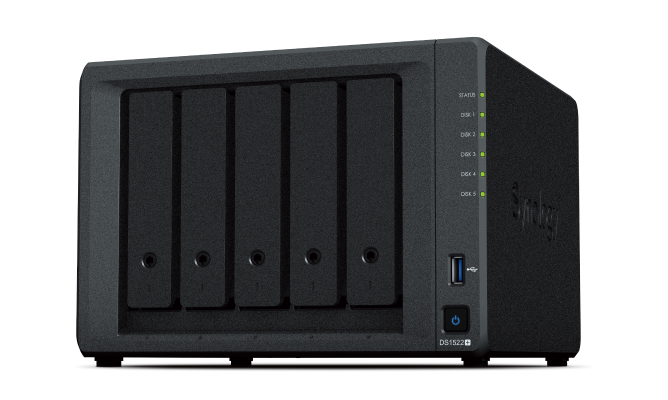
Philippine recommendation: For a Synology DS1522+ or DS1821+ (5–8 bay), RAID 6 is preferred over RAID 5 for business-critical file storage.
RAID 10 — Striped Mirror (RAID 1+0)
How it works: Drives are mirrored in pairs (RAID 1), then those mirrors are striped (RAID 0). Minimum 4 drives. Four 4TB drives in RAID 10 = 8TB usable capacity (50% efficiency, same as RAID 1).
Performance: Best write performance of any redundant RAID level — no parity calculation. Excellent read performance.
Redundancy: Can survive multiple drive failures as long as no mirror pair loses both drives. Typically more resilient in practice than RAID 5 or RAID 6 for random failures.
Rebuild time: Fast — only the mirrored pair needs rebuilding (not the entire array). A failed drive in RAID 10 rebuilds much faster than RAID 5/6.
When to use: The correct choice for database storage, virtualisation (VM storage), and any high-write workload. Performance and rebuild safety are worth the lower storage efficiency.
Philippine SME recommendation: RAID 10 for server VM storage, SQL Server database files, and any application requiring consistent write performance.
Summary: Which RAID for Which Workload
| Workload | Recommended RAID | Notes |
|---|---|---|
| OS drive (server boot) | RAID 1 | Simple, sufficient |
| VM datastore (VMware, Hyper-V) | RAID 10 | Write performance critical |
| SQL Server / database | RAID 10 | High IOPS, rebuild safety |
| File server (documents) | RAID 5 or RAID 6 | Read-heavy, sequential |
| NAS backup target | RAID 6 | Large drives, write safety |
| CCTV / surveillance | RAID 5 or RAID 6 | Sequential write, large capacity |
| 2-bay NAS | RAID 1 | Only option with 2 drives |
Hot Spare
A hot spare is an additional drive installed in the array that is idle until a drive fails — at which point the controller immediately begins rebuilding to the hot spare without requiring manual intervention.
Recommendation for Philippine server rooms: Always configure a hot spare for business-critical arrays. The time between a drive failure being detected (alert from NAS or server) and a technician physically replacing the drive can be 24–48 hours in the Philippines (especially in provincial locations). A hot spare begins the rebuild immediately.
RAID Is Not Backup
Restating the opening point: RAID protects against single (or double) drive hardware failure only. For complete data protection, combine RAID with:
- Local NAS backup with immutable snapshots (protects against ransomware)
- Cloud backup (protects against site-level disaster)
- Regular restore testing (confirms backup actually works)
For Philippine SMEs specifying storage configurations for servers and NAS — all available through Technica Solutions Inc. — get in touch.
Related reading: How to Set Up a NAS Backup Server for Your Philippine SME · Hybrid Backup for Philippine SMEs: The 3-2-1 Rule · SSD vs HDD for Philippine Server Rooms in 2026
Talk to our I.T. Hardware team →