Synology vs QNAP NAS: Which Is Right for Your Philippine SME in 2026?
Network Attached Storage (NAS) remains a critical component of Philippine SME IT infrastructure for file sharing, backup, surveillance storage, and increasingly for hybrid cloud data management. Synology and QNAP dominate the SME NAS market in the Philippines, and both are available through Philippine IT distributors and resellers.
The choice between them is not straightforward because both platforms are technically capable — the difference is in the deployment experience, software philosophy, and the type of IT environment where each performs best.
Platform Philosophy
Synology: Software-First, Simplicity-Oriented
Synology's core strength is DiskStation Manager (DSM) — one of the most polished NAS operating systems available. Synology invests heavily in software, and DSM's application ecosystem (Synology Drive, Moments, Surveillance Station, Active Backup, Hyper Backup, Synology Photos) is cohesive and well-integrated.
Synology's approach: make NAS accessible to IT generalists and SME administrators who are not storage specialists. DSM's interface is clean, feature discovery is intuitive, and most configurations are straightforward without deep storage knowledge.
The tradeoff: Synology NAS units are typically priced higher per unit of hardware specification than QNAP. You pay for the software quality and simplicity.
QNAP: Hardware-First, Feature-Dense
QNAP's strength is hardware flexibility. QNAP offers more NAS units with PCIe expansion slots, 10GbE networking, M.2 NVMe cache slots, and higher RAM capacity at lower price points than comparable Synology units.
QNAP's QTS operating system has a broader feature set out of the box — including built-in virtualisation (Virtualisation Station), container management (Container Station), and an integrated app ecosystem. For IT administrators comfortable with Linux-based systems and container workloads, QNAP provides more flexibility.
The tradeoff: QTS has more features but a steeper learning curve. QNAP's software quality has historically been less consistent than Synology's, and QNAP has had a higher incidence of firmware vulnerabilities that required rapid patching.
Current Model Comparison (2026)
Synology Recommended Models for Philippine SMEs
| Model | Bays | CPU | RAM | Key Features | Approximate PH Price |
|---|---|---|---|---|---|
| DS423 | 4-bay | Realtek RTD1619B | 2GB (upgradeable to 6GB) | SME file sharing, surveillance, Hyper Backup | ₱30,000–38,000 |
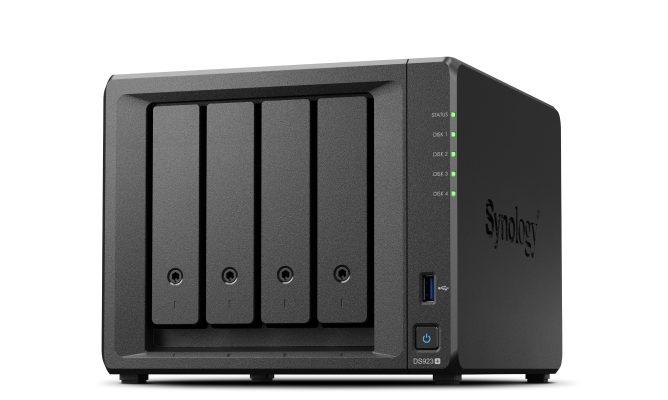
| DS923+ | 4-bay | AMD Ryzen R1600 | 4GB (upgradeable to 32GB) | Business workloads, 10GbE-ready, expansion unit support | ₱55,000–70,000 |
| DS1522+ | 5-bay | AMD Ryzen R1600 | 8GB (upgradeable to 32GB) | Mid-size business, expansion to 15 bays, M.2 cache | ₱75,000–95,000 |
| RS1221+ | 8-bay (rack) | AMD Ryzen V1500B | 8GB (upgradeable to 32GB) | Rack deployment, virtualisation, iSCSI | ₱120,000–150,000 |
QNAP Recommended Models for Philippine SMEs
| Model | Bays | CPU | RAM | Key Features | Approximate PH Price |
|---|---|---|---|---|---|
| TS-433 | 4-bay | Cortex-A55 quad-core | 4GB | Entry-level, multimedia, home/SME | ₱20,000–28,000 |
| TS-464 | 4-bay | Intel Celeron N5105 | 8GB | M.2 NVMe cache, 2.5GbE dual, PCIe slot | ₱35,000–45,000 |
| TS-873A | 8-bay | AMD Ryzen V1500B | 16GB | High-performance, dual 2.5GbE, PCIe expansion | ₱85,000–110,000 |
| TS-h886 | 8-bay | Intel Xeon D | 32GB ECC | Enterprise-grade, ZFS, dual 10GbE | ₱180,000–230,000 |
Feature-by-Feature Comparison
Backup and Data Protection
Synology excels here. Active Backup for Business (included at no additional cost) provides agentless backup for Windows endpoints, VMware VMs, Microsoft 365, and Google Workspace. Hyper Backup handles off-site backup to cloud targets (Backblaze B2, AWS S3, Azure, another Synology). The backup workflow is well-designed and reliable.
QNAP provides NetBak PC Agent for endpoint backup and RTRR for replication, but the backup ecosystem is less cohesive than Synology's. Third-party backup tools (Veeam, Nakivo) integrate with both platforms.
Winner for Philippine SME backup: Synology — the integrated backup ecosystem reduces the need for additional software licences. For a step-by-step setup guide, see our NAS backup setup guide for Philippine SMEs.
File Sharing and Collaboration
Synology Drive is Synology's Google Drive-equivalent — file sync, sharing, version history, and web editing. For SMEs replacing Google Drive or OneDrive with on-premise storage, it is highly functional.
QNAP File Station and Qsync provide equivalent file sharing capability but the interface is less polished. QNAP's strength is broader protocol support (SMB, NFS, AFP, FTP, WebDAV) and better enterprise storage protocol support.
Winner: Tie — Synology for a better UX; QNAP for broader protocol flexibility.
Virtualisation and Container Support
QNAP has a clear advantage here. Container Station runs Docker containers and Linux Container (LXC) natively and is well-implemented. Virtualisation Station allows running full VMs. For IT administrators wanting to run containerised services (PiHole, monitoring tools, development environments) on their NAS, QNAP is the stronger platform.
Synology has improved container support (Container Manager, formerly Docker) and Virtual Machine Manager, but QNAP's implementation is more robust for heavy container workloads.
Winner for virtualisation/containers: QNAP.
Surveillance Storage
Both platforms support surveillance storage with their own camera management software — Synology Surveillance Station and QNAP Surveillance Station. Both support ONVIF-compatible IP cameras.
Synology's licensing model is more expensive for large camera counts (Camera Licences are paid per camera above 2 included). QNAP includes more base camera licences.
Winner for large surveillance deployments: QNAP on cost; Synology on software quality.
Security Track Record
This is a meaningful differentiator. Both platforms have experienced security incidents, but QNAP has had a higher frequency of critical vulnerabilities requiring urgent firmware updates — including ransomware campaigns specifically targeting QNAP NAS devices (DeadBolt, Qlocker) that compromised thousands of units globally.
Synology has had fewer critical vulnerabilities and generally faster patch turnaround. For Philippine SMEs where IT administration is limited and firmware updates may not be applied promptly, Synology's better security track record is a practical advantage.
Winner on security track record: Synology.
Which Platform for Which Philippine SME Profile
| Profile | Recommendation |
|---|---|
| SME with limited IT staff, needs reliable file sharing and backup | Synology — simpler management, better backup ecosystem |
| SME with technical IT staff wanting container and VM capability | QNAP — more hardware flexibility and virtualisation features |
| Office replacing Google Drive/OneDrive with on-premise storage | Synology — Synology Drive is the strongest Dropbox/Drive equivalent |
| Surveillance-heavy deployment (8+ cameras) | QNAP — better camera licence economics |
| Rack-mounted server room deployment | Either — both have strong rack NAS options; Synology for simplicity, QNAP for feature density |
| Budget-constrained deployment | QNAP — better hardware specs per peso at entry level |
Drives: What to Put Inside
Both Synology and QNAP have vendor-approved hard drive compatibility lists. Deviating from the list is not prohibited but may void warranty support.
For Philippine SME deployments:
- Seagate IronWolf (NAS-rated, 3–5 year warranty) — widely available in the Philippines, priced competitively
- WD Red Plus — NAS-rated CMR drives, reliable for SME workloads
- Seagate IronWolf Pro / WD Red Pro — for 8+ bay deployments with 24/7 workloads
Avoid: desktop drives (Seagate Barracuda, WD Blue) in NAS enclosures — they are not rated for the continuous operation and vibration environment of a multi-drive NAS.
SSD cache: for workloads with many small random reads (database-backed applications, Synology Photos, Surveillance Station), adding M.2 NVMe SSD cache significantly improves responsiveness. Synology DS923+ and DS1522+ support M.2 cache; most QNAP units with PCIe slots support it via adapter.
For Philippine SMEs specifying a NAS for file sharing, backup, or hybrid cloud storage, get in touch.
Related reading: How to Set Up a NAS Backup Server for Your Philippine SME · Hybrid Backup for Philippine SMEs: The 3-2-1 Rule · RAID Levels Explained for Philippine Server Rooms
Talk to our I.T. Hardware team →