Hybrid Backup for Philippine SMEs: Combining NAS and Cloud Using the 3-2-1 Rule
Philippine businesses face a specific set of disaster scenarios that make the 3-2-1 backup rule not just best practice but business necessity:
Hardware failure — drives fail, servers crash, and NAS units have finite lifespans. Single-copy backup on the same device that holds production data is not backup at all.
Ransomware — encrypts files on every network-connected storage device it can reach, including NAS devices mounted as network shares. A ransomware incident without offsite backup typically means paying the ransom or losing the data.
Fire and flooding — the Philippines experiences more fire incidents per capita than most developed markets. Typhoon-related flooding affects ground-floor server rooms and office spaces regularly, particularly in Luzon and Visayas. Onsite-only backup does not survive these events.
Theft — equipment theft from Philippine SME offices is not uncommon. An onsite backup stolen with the primary equipment provides no recovery capability.
The 3-2-1 rule addresses all of these scenarios with a single architectural principle.
The 3-2-1 Rule Explained
| Requirement | What It Means | Why It Matters |
|---|---|---|
| 3 copies of your data | Production data + at least 2 backup copies | Single backup fails; two backups mean one can be corrupted or inaccessible |
| 2 different storage media | e.g., internal SSD + NAS + cloud | All drives from the same batch can fail simultaneously; media diversity prevents this |
| 1 offsite copy | One backup stored geographically separate from your office | Protects against fire, flooding, theft — events that destroy everything at one location |
The modern addition — 3-2-1-1: Adding a fourth requirement: 1 offline or immutable copy — a backup that cannot be modified or deleted by ransomware or a compromised administrator account.
The Hybrid Architecture: NAS + Cloud
The most practical 3-2-1 implementation for Philippine SMEs combines:
Copy 1: Production data — on the primary server, workstations, or cloud (M365/Google Workspace)
Copy 2: Local NAS backup — on a Synology or QNAP NAS device on the office network, with immutable snapshots (see our NAS setup guide for Philippine SMEs for step-by-step configuration)
Copy 3: Cloud backup — offsite replication of the NAS backup (or direct cloud backup of the primary data) to Backblaze B2, AWS S3, Azure Blob Storage, or Google Cloud Storage
This architecture provides:
- Fast local recovery (restore from NAS — minutes to hours)
- Offsite protection (cloud copy survives office-level disasters)
- Ransomware resistance (NAS immutable snapshots + cloud versioning)
Local NAS Backup: Synology Configuration
Hardware Selection
For a Philippine SME with 5–50 users and 1–10TB of data:
| NAS Model | Bays | Best For |
|---|---|---|
| Synology DS423 | 4-bay | Small office, up to 32TB raw |
| Synology DS923+ | 4-bay | Medium office, expandable, faster CPU |
| Synology DS1522+ | 5-bay | Larger office, expansion units available |
Drive selection: Seagate IronWolf or WD Red Plus NAS-rated drives, in RAID 1 (mirroring) or RAID 5/6 for the NAS storage pool. For a full explanation of which RAID level fits which workload, see our RAID levels explained guide.
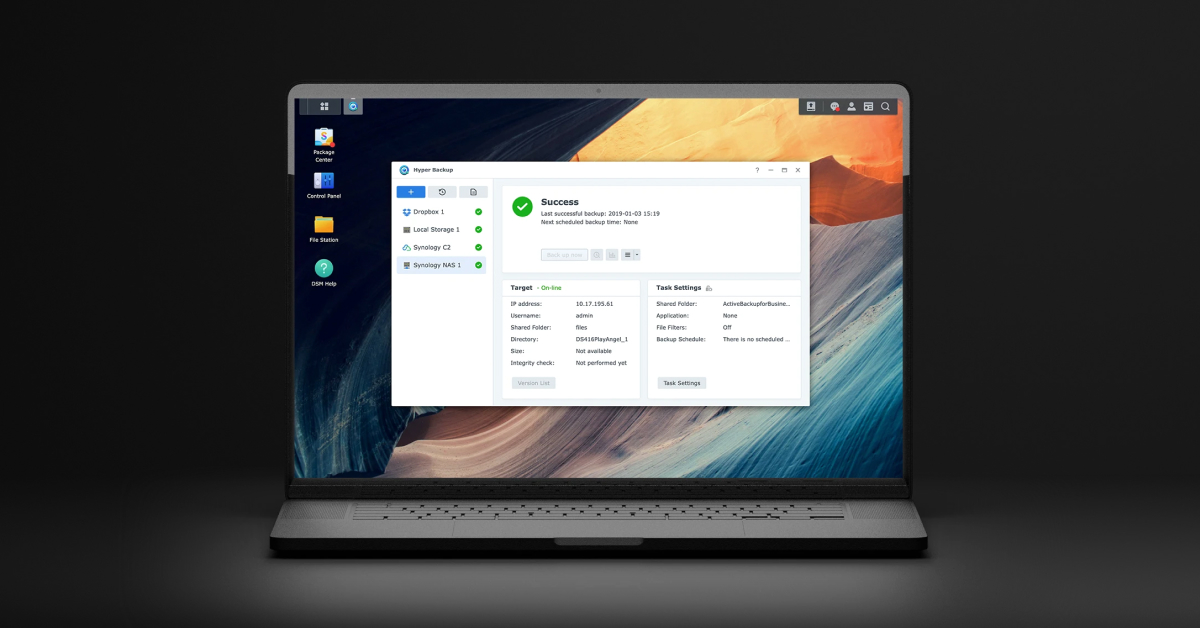
Synology Hyper Backup: Backing Up to the NAS
Synology's Active Backup for Business provides agentless backup of:
- Windows file servers and workstations
- VMware virtual machines
- Microsoft 365 data (Exchange Online, SharePoint, OneDrive, Teams)
- Google Workspace data (Gmail, Drive, Calendar, Contacts)
Active Backup is included with Synology NAS at no additional software cost — this is Synology's most significant advantage over QNAP for Philippine SME backup use cases.
Configuration for M365 backup:
- Install Active Backup for Microsoft 365 from Synology Package Centre
- Connect to your Microsoft 365 tenant via OAuth
- Select users, SharePoint sites, and Teams to back up
- Configure retention policy (90 days minimum recommended; 1 year for financial records)
- Schedule backup frequency (daily minimum; hourly for critical data)
Immutable Snapshots: Ransomware Protection
The critical NAS configuration for Philippine offices with ransomware exposure: snapshot schedules with snapshot retention that cannot be deleted without admin credentials.
Synology Snapshot Replication configuration:
- Enable snapshots on all shared folders containing backed-up data
- Schedule: every 4 hours during business hours, daily overnight
- Retention: keep snapshots for 30 days
- Snapshot lock: enabled (snapshots cannot be deleted even by the backup operator account)
With locked snapshots, ransomware that encrypts the NAS shared folders cannot delete the snapshots — recovery is possible by rolling back to a pre-infection snapshot.
Critical detail: the Synology admin account used for snapshot management should use a strong password distinct from the backup operator account, and MFA should be enabled for the admin account.
Cloud Backup: The Offsite Copy
Option 1: NAS-to-Cloud Replication (Synology Hyper Backup Vault)
Synology Hyper Backup replicates backup data from the local NAS to a cloud storage target. Supported targets:
| Cloud Target | Cost (Approximate) | Notes |
|---|---|---|
| Backblaze B2 | USD $6/TB/month | Lowest cost object storage; no egress for Synology uploads |
| AWS S3 | USD $23/TB/month | Higher cost; strong for compliance |
| Azure Blob Storage (Cool) | USD $10/TB/month | Good for organisations on Azure/M365 |
| Google Cloud Storage (Nearline) | USD $10/TB/month | Good for Google Workspace organisations |
| Synology C2 Storage | USD $9.99/TB/month | Synology's own cloud; simplest integration |
For a Philippine SME with 5TB of backup data:
- Backblaze B2: approximately USD $30/month (₱1,700/month)
- Azure Blob Cool: approximately USD $50/month (₱2,900/month)
Cloud backup storage is the most cost-effective offsite option for Philippine SMEs — no remote office, no tape rotation, no courier service.
Option 2: Direct Cloud Backup (Microsoft 365 Third-Party Backup)
For organisations whose primary data is in Microsoft 365 (Exchange Online, SharePoint, OneDrive, Teams), direct M365 cloud backup via third-party tools adds backup independent of Microsoft's built-in retention:
| Product | Cost |
|---|---|
| Acronis Backup for Microsoft 365 | USD $3–5/user/month |
| Veeam Backup for Microsoft 365 | USD $4–6/user/month |
| AvePoint Cloud Backup | USD $4–7/user/month |
Why M365 built-in retention is not backup: Microsoft's recycle bin and version history have retention limits (93 days maximum for deleted items) and are scoped to individual users. A ransomware attack that corrupts all files, or an admin error that deletes a SharePoint site, may exceed these retention limits. Third-party backup provides independent, longer-term point-in-time recovery.
Backup Testing: The Most Overlooked Step
A backup that has never been tested is not a backup — it is a belief. Philippine SMEs should test backup recovery at minimum quarterly:
File-level recovery test:
- Select a sample of 50–100 files from backup (mix of recent and older)
- Restore them to a test folder
- Verify file integrity — open a sample, confirm content
Full server recovery test (annually):
- Restore a backup image to a test VM or spare hardware
- Boot the restored system
- Verify key applications start and data is accessible
M365 recovery test:
- Restore a test user's deleted emails from backup (not from recycle bin)
- Restore a SharePoint file from 60 days ago
- Verify the restored data is accessible and complete
Document each test with date, what was tested, and result. This documentation demonstrates due diligence to NPC, auditors, or clients who inquire about backup practices.
Recovery Time Objectives for Philippine SMEs
Define these before a disaster, not during:
| Scenario | Recovery Target | Achievable With |
|---|---|---|
| Single file accidentally deleted | Under 15 minutes | NAS snapshot rollback |
| Ransomware on 1 server | Under 4 hours | NAS backup image restore |
| Office fire (all local equipment destroyed) | Under 24–48 hours | Cloud backup restore to new hardware |
| Full ransomware across all devices | Under 48–72 hours | Cloud backup + new hardware |
| M365 data loss | Under 2 hours | Third-party M365 backup restore |
For Philippine SMEs setting up or auditing their backup architecture — NAS, cloud backup, or Microsoft 365 backup — get in touch.
Related reading: How to Set Up a NAS Backup Server for Your Philippine SME · Synology vs QNAP NAS: Which Is Right for Your Philippine SME? · RAID Levels Explained for Philippine Server Rooms
Talk to our I.T. Hardware team →