Mobile Device Management (MDM) for Philippine Businesses: What It Does and Which Platform to Use
The BYOD (Bring Your Own Device) model is the default in most Philippine SMEs — employees use personal phones and personal laptops to access company email, Microsoft Teams or Google Workspace, and business applications. It is convenient and avoids hardware costs. It also means the IT team has no visibility into, and no control over, the devices accessing company data.
When a staff member's personal phone — with 3 years of company emails, access to SharePoint or Google Drive, and WhatsApp group chats containing client information — is lost or stolen, the organisation has no way to remotely lock or wipe it. If a personal laptop with company files is sold or given away without being wiped, the data goes with it.
Mobile Device Management (MDM) and Unified Endpoint Management (UEM) address this by giving IT the ability to manage, secure, and control devices — whether corporate-owned or personal — that access company resources.
What MDM Actually Does
Device Enrolment and Inventory
MDM begins with enrolment — the device (phone, tablet, laptop, desktop) registers with the MDM platform. Once enrolled:
- IT has an inventory of all enrolled devices, their OS version, last check-in time, and compliance status
- Policies are pushed to enrolled devices automatically
- Device status is visible from a central management console
Policy Enforcement
MDM enforces security policies on enrolled devices:
- PIN/passcode requirement: mandate a minimum 6-digit PIN or biometric lock
- Encryption: require device storage to be encrypted
- Screen lock timeout: auto-lock after 5 minutes of inactivity
- OS version requirement: flag or quarantine devices running outdated operating systems with known vulnerabilities
- Jailbreak/root detection: identify and quarantine compromised devices
Application Management
- App deployment: push required business applications (Teams, Outlook, Authenticator) to enrolled devices without requiring users to find and install them
- App restriction: block installation of specific applications (unapproved file-sharing tools, camera apps in secure areas)
- Managed app configuration: pre-configure Microsoft 365 apps with the correct tenant settings so users do not have to enter server details manually
Remote Actions
- Remote lock: immediately lock a device that has been reported lost or stolen
- Remote wipe: erase all data on a device — full wipe (wipes everything including personal data) or selective wipe (removes only corporate data from managed apps, leaving personal data intact)
- Retirement: remove corporate data and MDM management when an employee leaves, without affecting personal content
Conditional Access Integration
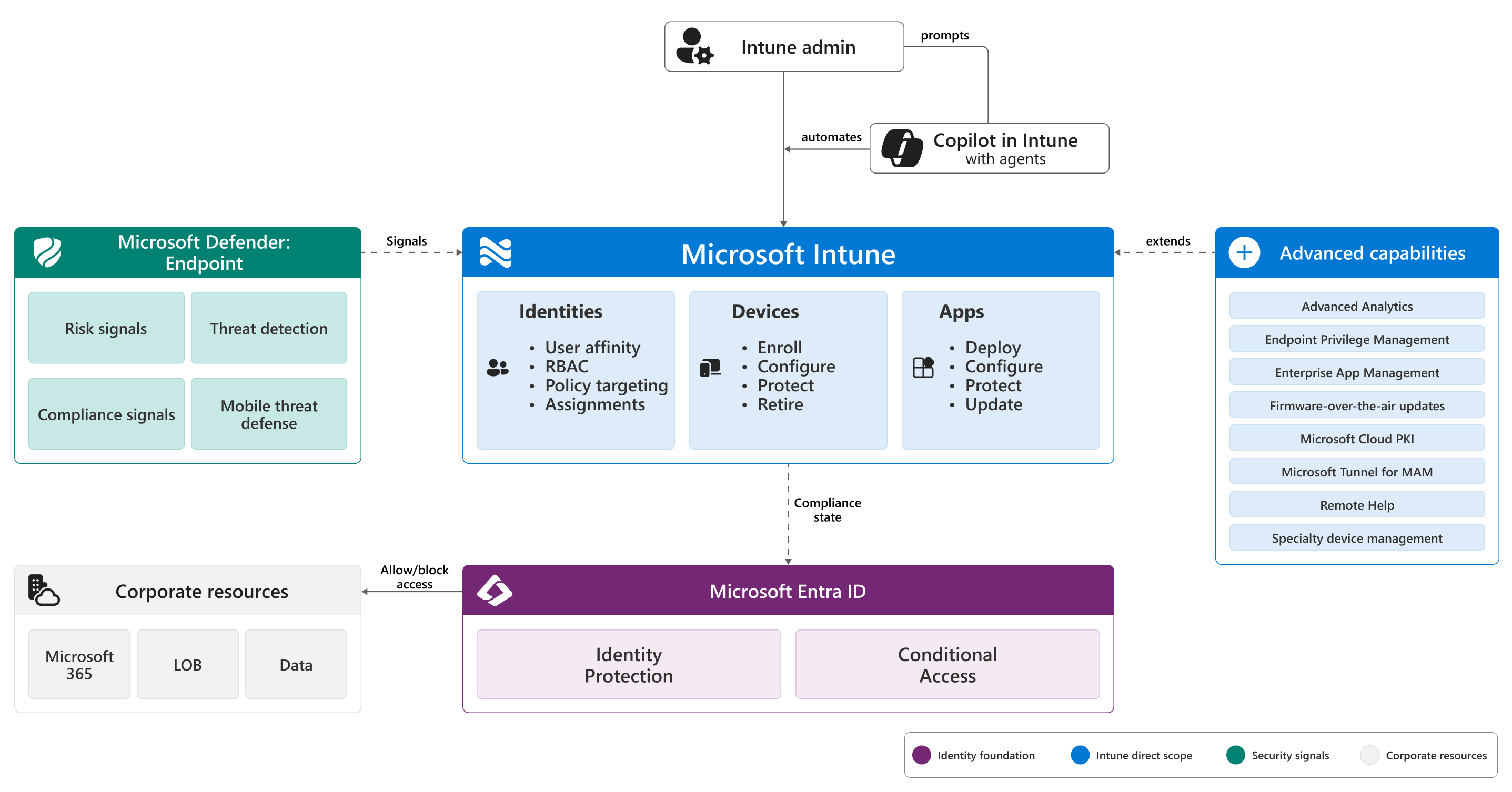
The most security-impactful MDM capability: integration with Microsoft Entra ID (for M365) or Google Workspace Endpoint Verification (for Google). This allows Conditional Access policies that require device compliance:
"Only enrolled, compliant devices can access SharePoint and Exchange."
An unmanaged personal device — even with valid credentials — is blocked from accessing corporate resources until enrolled and compliant. This closes the gap where stolen credentials alone are sufficient to access company data from any device.
MDM Platform Options for Philippine Businesses
Microsoft Intune (included in Microsoft 365 Business Premium)
The most natural MDM choice for Philippine organisations on Microsoft 365. Included in Business Premium without additional cost.
What Intune manages:
- Windows 10/11 (PC management — applications, updates, configuration, BitLocker encryption)
- macOS (Mac laptops enrolled in Intune for compliance and configuration)
- iOS/iPadOS (iPhones and iPads)
- Android (phones and tablets)
Key capabilities:
- Autopilot (Windows): new Windows PCs configure themselves automatically from a cloud profile — zero-touch provisioning
- Compliance policies: define what makes a device "compliant" (encryption, PIN, OS version)
- Conditional Access integration: block non-compliant devices from M365 apps
- App Protection Policies (MAM): enforce MDM-like policies on managed apps without full device enrollment — useful for BYOD where employees don't want to fully enrol personal phones
Philippine deployment path: Enable Intune in the Microsoft 365 admin centre → Create compliance policies → Deploy via Autopilot (corporate Windows PCs) or self-enrolment (personal phones)
ManageEngine Endpoint Central (formerly Desktop Central)
A comprehensive Unified Endpoint Management platform from Zoho's ManageEngine, available as cloud or on-premise.
Free tier: manages up to 25 devices at no cost — appropriate for small Philippine offices evaluating MDM before committing to paid plans.
Paid plans: USD $2–4/device/month for the full platform.
Advantages over Intune:
- Works with Microsoft 365, Google Workspace, or no specific cloud ecosystem
- Strong Windows patch management
- Remote desktop support built in
- On-premise deployment option for organisations that cannot use cloud MDM
Best for: Philippine SMEs not on Microsoft 365, or organisations wanting MDM independent of their cloud provider.
Scalefusion
An MDM/UEM platform specifically positioned for SMEs and mid-market, with active marketing and support presence in the Philippines.
Pricing: USD $3.25–4/device/month
Strengths:
- Strong Android device management (relevant for BYOD-heavy Philippine environments)
- Kiosk mode for dedicated-purpose devices (POS systems, visitor tablets, digital signage)
- Philippine-based support presence
- Easy deployment for non-technical administrators
Best for: Philippine businesses with Android-heavy environments, POS/kiosk deployments, or organisations wanting local support for MDM.
Google Endpoint Management (included in Google Workspace)
For organisations on Google Workspace, basic device management is included:
- Fundamental device management (free in all plans): password policies, remote wipe, basic compliance reporting for Android and iOS
- Advanced endpoint management (included in Business Plus and Enterprise): app management, compliance policies, Context-Aware Access integration — equivalent to basic Intune functionality
Best for: Google Workspace users who need MDM without additional cost or vendors.
BYOD vs Corporate Device Policy
The MDM decision is intertwined with your device policy:
Corporate-owned devices only
Every employee uses a company-issued device, fully managed by IT. IT has complete control. Higher hardware cost, but simpler security posture.
For Philippine SMEs: realistic for companies where the laptop IS the work tool (IT firms, BPO, financial services). Less practical for roles where staff primarily use their own phones alongside a company laptop.
BYOD with MDM (full enrolment)
Personal devices fully enrolled in MDM. IT can see device inventory and enforce policies. Employees may resist full MDM enrolment on personal phones due to privacy concerns about employer access.
Philippine consideration: full device enrolment on personal phones (especially Android) allows IT to see the device's location, installed apps, and take remote wipe actions. Employees should understand and consent to this. A clear Acceptable Use Policy and MDM Enrolment Agreement should precede deployment.
BYOD with App Protection Policies (MAM only)
No full device enrolment required. Microsoft Intune App Protection Policies (or ManageEngine App Policies) enforce security requirements on specific managed apps (Outlook, Teams, OneDrive) without requiring full device management.
What MAM controls:
- Require PIN to open managed apps
- Block copy-paste from managed apps to personal apps
- Block screenshots within managed apps
- Remotely wipe corporate data from managed apps without affecting personal data
Best for: BYOD environments where employees will not accept full device enrolment. Less comprehensive than full MDM but closes the primary data leakage gaps.
When Philippine SMEs Actually Need MDM
You need MDM if:
- Staff access SharePoint, OneDrive, Teams, or Google Drive from personal devices (almost universal)
- You have had a device lost or stolen and could not remotely wipe it
- You have NPC obligations around personal data accessed on mobile devices
- You are BSP-regulated (MDM is part of technology risk management requirements)
- You are deploying corporate devices and want centralised patch management and configuration
You can defer MDM if:
- All staff only access company data from company-managed PCs (no phone/tablet access)
- Your organisation has fewer than 5 devices and management overhead is justified by scale
For most Philippine SMEs with staff accessing company email on personal phones, App Protection Policies (MAM) via Microsoft Intune — available at no additional cost in M365 Business Premium — is the immediate starting point.
If your Philippine organisation needs help deploying Microsoft Intune, configuring BYOD policies, or evaluating MDM platforms, get in touch.
Related reading: Microsoft Intune MDM Setup Guide · Conditional Access Policies for M365 · Zero Trust Security for Philippine Businesses
Talk to our Cloud & I.T. team →