Zero Trust Security for Philippine Businesses: What It Means and How to Implement It
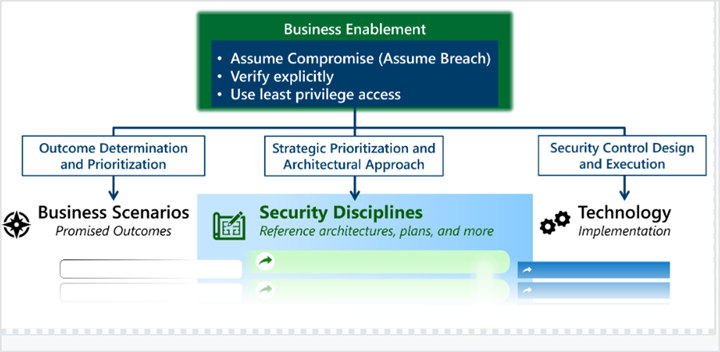
Zero trust is a security model built on a single principle: do not automatically trust any user, device, or network — even if they are inside your office. Verify every access request explicitly, grant only the minimum access required for the task, and assume that a breach may already have occurred.
This principle has moved from theoretical framework to regulatory requirement in the Philippines. In 2024, the Bangko Sentral ng Pilipinas issued guidelines requiring supervised financial institutions to adopt zero trust architecture as part of their cybersecurity frameworks. The National Privacy Commission's guidance on data governance aligns with the same principle: access to personal data must be controlled, audited, and granted on a least-privilege basis.
But zero trust is not just a compliance checkbox for banks. It is the correct security posture for any Philippine organisation running cloud applications, managing remote or hybrid workers, or storing sensitive client or employee data.
What Zero Trust Is Not
Zero trust is not a product you buy. It is not a single setting you enable. It is not the same as a VPN.
A VPN creates an encrypted tunnel between a device and the network — but once a user is "inside," they often have broad access to everything on that network. VPN access is binary: connected or not. Zero trust is continuous: every access request to every resource is evaluated based on who the user is, what device they are using, where they are, and what they are trying to access.
Zero trust is also not a project with a completion date. It is an architecture — a set of principles applied progressively across your environment.
The Five Pillars of Zero Trust in Practice
1. Identity Verification
Every user must authenticate before accessing any resource. Multi-factor authentication (MFA) is the baseline — password alone is insufficient.
For Microsoft 365 environments: Microsoft Entra ID with Conditional Access policies enforces MFA requirements. Risk-based access policies (Entra ID P2) can require additional verification when sign-in risk is elevated — for example, a login attempt from an unfamiliar location.
For Google Workspace environments: 2-Step Verification enforced via Admin Console, with Context-Aware Access policies controlling access based on device compliance and location.
Philippine implementation priority: Enable MFA for all users immediately. This single control blocks over 99% of automated credential attacks according to Microsoft's security data.
2. Device Health Verification
A verified user on a compromised device is still a security risk. Zero trust requires that only healthy, managed devices can access sensitive resources.
Microsoft path: Intune (included in Microsoft 365 Business Premium) enrolls and manages Windows, macOS, iOS, and Android devices. Conditional Access policies block access from unmanaged or non-compliant devices.
Google path: Endpoint Verification (Google Workspace) + Context-Aware Access restricts resource access to enrolled, policy-compliant devices.
Philippine SME note: Many organisations have unmanaged personal devices (BYOD) accessing company email and files. These devices are outside the organisation's security posture. Deploying an MDM solution and enforcing device compliance is the step that closes this gap.
3. Least-Privilege Access
Users should have access only to the resources they need for their specific role — nothing more.
In Microsoft 365: Role-Based Access Control (RBAC) in Entra ID, SharePoint permission levels, and Teams channel membership all implement least-privilege. Privileged Identity Management (Entra ID P2) provides just-in-time admin access — administrators have elevated rights only for the duration of a specific task.
In Google Workspace: Organisational Unit structure and group-based application access enforce access boundaries. Shared Drive permissions restrict file access to defined groups.
Common Philippine SME gap: Everyone is a SharePoint/Drive admin "for convenience." This violates least-privilege and creates significant blast radius when a single account is compromised.
4. Network Segmentation
Do not allow all devices on a network to communicate with all other devices. Segment the network so that a compromised device cannot move laterally to infect other systems.
For cloud-first environments (M365, Google Workspace), network segmentation is less about physical switches and more about:
- Micro-segmentation at the application layer through Conditional Access policies
- VLAN separation between staff workstations, guest Wi-Fi, server room, and IP cameras
- Firewall rules that allow only necessary traffic between segments
For physical office networks: separate VLANs for corporate devices, guest access, IoT/security cameras, and server infrastructure. Prevent cross-VLAN communication by default.
5. Continuous Monitoring and Logging
Zero trust assumes breach. Continuous monitoring detects anomalous behaviour — a user downloading 10GB of data at 2am, a login from an unexpected country, an admin account used for the first time in months.
Microsoft Defender for Business (included in Microsoft 365 Business Premium) provides endpoint detection, threat intelligence, and security alerts across enrolled devices.
Microsoft Sentinel (Azure-based SIEM) aggregates logs from across the M365 and Azure environment and applies AI-driven threat detection.
Google Chronicle (Google Cloud) provides equivalent SIEM capability for Google Workspace environments.
At minimum, every Philippine SME should have audit logging enabled for Microsoft 365 or Google Workspace — recording sign-in events, admin actions, file access, and sharing activities. Logs should be retained for at least 90 days.
The BSP Zero Trust Requirements for Philippine Banks
BSP's Memorandum No. M-2023-010 and subsequent circulars establish that BSP-supervised financial institutions must:
- Implement multi-factor authentication for all privileged access and remote access
- Adopt a least-privilege model for access management
- Apply network segmentation and micro-segmentation
- Implement continuous monitoring and anomaly detection
- Conduct regular access reviews and remove access when no longer required
For Philippine rural banks, thrift banks, and digital lending companies that may not have dedicated security teams, these requirements translate to: deploy Microsoft 365 Business Premium or equivalent, enable Conditional Access + MFA, deploy Intune, and enable Microsoft Defender for Business.
Zero Trust Implementation Roadmap for Philippine SMEs
Phase 1 — Identity Foundation (Month 1)
- Enable MFA for all users via Microsoft Entra ID or Google Workspace
- Block legacy authentication protocols (SMTP, IMAP without MFA)
- Review and remove unused accounts
- Implement Conditional Access: require MFA from all locations, block known risky sign-ins
Phase 2 — Device Management (Month 2–3)
- Deploy Intune (M365) or Endpoint Verification (Google Workspace)
- Enroll all corporate devices
- Configure Conditional Access: require compliant device for Exchange, SharePoint, Teams
- Establish BYOD policy — personal devices on separate guest network, not enrolled
Phase 3 — Access Controls (Month 3–4)
- Audit current permissions: who has access to what
- Remove excess SharePoint/Drive permissions
- Implement RBAC for administrative functions
- Enable Privileged Identity Management if on M365 E5 or equivalent
Phase 4 — Network and Monitoring (Month 4–6)
- Segment office network (staff VLAN, guest VLAN, server VLAN, IoT VLAN)
- Enable Microsoft Defender for Business or Google endpoint protection
- Enable audit logging — M365 audit log, Google Workspace Admin audit
- Establish log review process (weekly minimum)
Zero trust is not a transformation you complete in a sprint — it is a direction. Philippine organisations that start with Phase 1 (MFA + Conditional Access) are materially more secure than those still running username-and-password-only access, and the Phase 1 investment is available in existing Microsoft 365 and Google Workspace licences.
If you are mapping a zero trust implementation for your Philippine organisation — whether driven by BSP compliance, NPC requirements, or general security posture — get in touch.
Related reading: Conditional Access Policies for M365 · Microsoft Intune MDM Setup · Ransomware Protection for Philippine SMEs
Talk to our Cloud & I.T. team →