Microsoft Sentinel SIEM: Cloud Security Monitoring for Philippine Businesses
A SIEM (Security Information and Event Management) system collects logs from every source in your environment — firewalls, servers, Microsoft 365, cloud services — correlates them to detect attack patterns, and alerts your security team before a breach completes. Traditionally, running a SIEM meant buying expensive appliances, deploying on-premise infrastructure, and hiring dedicated security analysts.
Microsoft Sentinel changes this: it is a cloud-native SIEM that ingests logs from Microsoft 365, Azure, on-premise systems, and third-party tools — all without running any servers — and uses AI to surface threats that manual log review would miss.
What Microsoft Sentinel Does
Data Collection
Sentinel ingests logs via data connectors — pre-built integrations for:
- Microsoft 365 — Exchange Online, SharePoint, Teams, Entra ID sign-in logs, audit logs
- Azure — Azure Activity, Azure AD, Defender for Cloud alerts, Azure Firewall
- Microsoft Defender — Defender for Endpoint, Defender for Identity, Defender for Office 365
- Third-party — Fortinet FortiGate, Cisco ASA, Palo Alto, AWS CloudTrail, Google Cloud Platform
- On-premise — Windows Event Logs, Linux Syslog, Sysmon, custom applications via Log Analytics Agent
For Philippine organisations running Microsoft 365 and Azure, the native Microsoft connectors enable zero-configuration log ingestion — no syslog server, no firewall rules, no on-premise infrastructure.
Threat Detection
Sentinel uses three detection mechanisms:
Analytics rules — correlation rules that trigger alerts when specific patterns occur. Microsoft provides hundreds of built-in rules for common attack patterns: password spray, impossible travel login, lateral movement, ransomware staging. These apply immediately without configuration.
Machine learning anomaly detection — Sentinel's ML models learn baseline behaviour per user and per entity. A user who suddenly downloads 10GB of files after never doing so before triggers an anomaly alert, even if no rule was written for this scenario.
UEBA (User and Entity Behaviour Analytics) — tracks risk scores per user and device, combining multiple weak signals (unusual login time, new location, large file download) into a composite risk score that surfaces high-risk accounts before an incident completes.
Investigation and Response
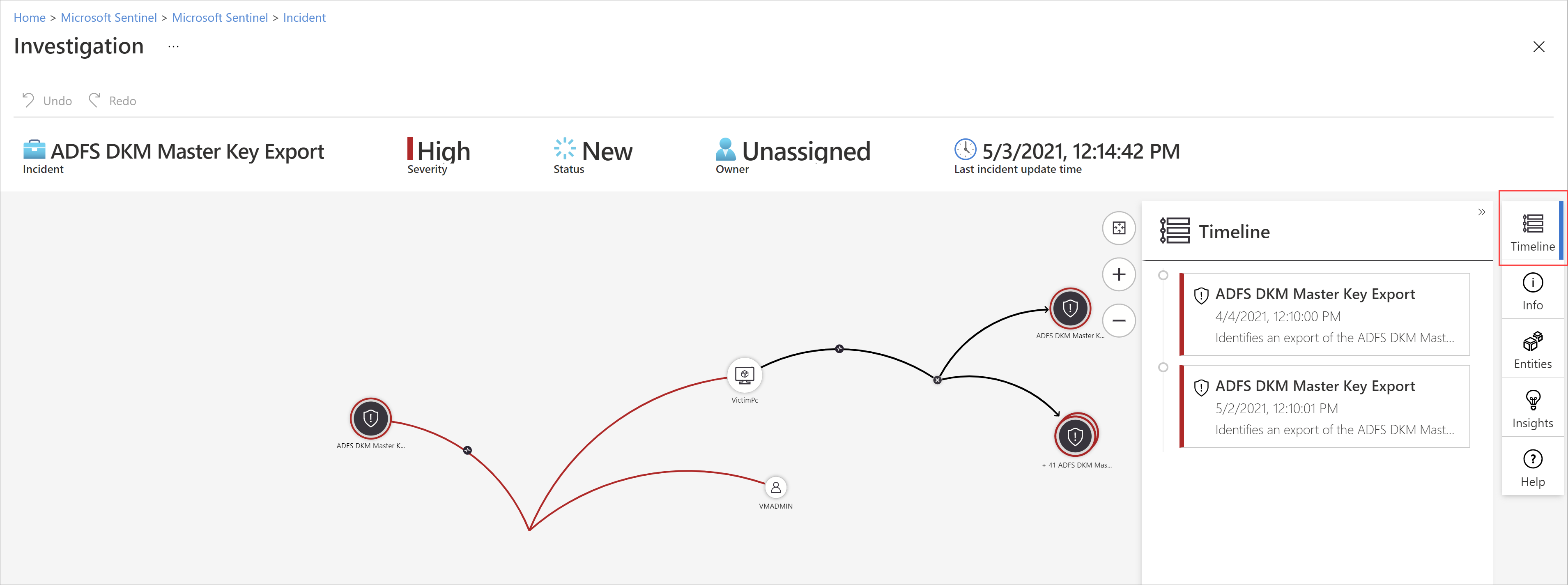
When an alert fires, Sentinel creates an incident — a grouped collection of related alerts with a timeline, affected entities, and investigation graph showing how events are connected. Analysts can pivot from a suspicious login to the user's full activity history to the specific M365 audit events in a single interface.
SOAR (Security Orchestration, Automation, and Response): Sentinel integrates with Microsoft Defender and Power Automate to trigger automated responses — isolate a device, disable a user account, block an IP — reducing response time from hours to seconds.
Philippine Compliance Use Cases
BSP Circular 1140 — Technology Risk Management
BSP requires BSFIs (banks, e-money issuers, payment system operators) to maintain security monitoring with audit trails, anomaly detection, and incident response capabilities. Sentinel's log retention (up to 2 years in Log Analytics), built-in Microsoft 365 audit log integration, and UEBA capabilities directly address BSP's monitoring requirements.
Specific requirements addressed:
- Centralised log collection from all critical systems
- Real-time alerting on anomalous activity
- Incident documentation and audit trail
- Detection of privileged account misuse
NPC Breach Notification — RA 10173
Under NPC Circular 16-03, Philippine organisations must notify the NPC within 72 hours of discovering a qualifying personal data breach. Sentinel accelerates breach discovery — anomaly detection surfaces incidents that would otherwise be found only in post-incident forensics.
Sentinel's contribution: The investigation graph and timeline reconstruction mean your incident response team can determine breach scope and affected data subjects in hours rather than days — critical for meeting the 72-hour notification window.
SEC/PSE Listed Company Requirements
Philippine publicly listed companies face increasing cybersecurity disclosure requirements. Sentinel provides the audit trail and incident documentation needed for board-level reporting on cybersecurity incidents.
Deployment for Philippine Organisations
Prerequisites
- Microsoft 365 subscription (any plan) or Azure subscription
- Log Analytics workspace (Sentinel runs on top of this)
- For M365 data connectors: Microsoft 365 E3 or E5, or Microsoft 365 Defender licences
Recommended connector activation sequence for Philippine SME/mid-market:
Phase 1 (Week 1) — Microsoft 365 sources:
- Microsoft Entra ID (sign-in logs, audit logs)
- Microsoft 365 Defender (email, Teams, SharePoint threats)
- Office 365 activity logs
Phase 2 (Week 2–3) — Infrastructure: 4. Azure Activity and Azure AD 5. Windows Security Events from servers 6. On-premise firewall (FortiGate, Cisco) via Syslog
Phase 3 (Month 2) — Analytics tuning: 7. Enable UEBA 8. Tune detection rules to reduce false positives 9. Configure automation rules for common responses
Pricing (Philippine Context, June 2026)
Sentinel pricing has two components:
Data ingestion: USD $2.46/GB ingested per day (Pay-As-You-Go). Commitment tiers at 100GB/day, 200GB/day, etc. reduce the per-GB rate by 15–65%.
Data retention: 90 days free included. Beyond 90 days: USD $0.12/GB/month.
Microsoft 365 E5 benefit: M365 E5 subscribers receive a free data ingestion benefit covering Microsoft 365 audit logs — the most valuable data source for Philippine organisations. This effectively makes Sentinel free for M365 E5 customers for their core M365 log data.
Typical Philippine SME estimate (50 users, M365 E3):
- M365 Defender connector: ~5–10 GB/day
- Azure AD sign-in logs: ~1–2 GB/day
- Monthly cost estimate: USD $300–600/month
Cost optimisation: Enable the free Microsoft 365 benefit (if on E5), use the Auxiliary Logs tier for verbose logs you rarely query (saves 80% vs standard ingestion), and archive logs older than 90 days to Azure Data Lake.
Microsoft Sentinel vs On-Premise SIEM
| Microsoft Sentinel | On-Premise SIEM (Splunk, IBM QRadar) | |
|---|---|---|
| Infrastructure | Zero — cloud-native | Dedicated servers, HA cluster |
| M365 integration | Native, zero-config | Requires custom connectors |
| Upfront cost | None | ₱500K–5M+ hardware + licences |
| Operational cost | Pay-per-GB ingested | Staff to maintain infrastructure |
| Scalability | Automatic | Manual capacity planning |
| Philippine deployment | Immediate | 3–6 month implementation |
For Philippine organisations already on Microsoft 365 and Azure, Sentinel is the clear default — zero infrastructure, native integration, and Microsoft's global threat intelligence feeds included.
See our zero trust security guide, conditional access policies guide, and Microsoft 365 E3 vs E5 comparison for the broader security architecture.
Related reading: Zero trust security Philippines · Conditional access M365 · Email security gateway · Ransomware protection Philippines
For Philippine organisations deploying Microsoft Sentinel — setup, data connector configuration, and analytics rule tuning — available through Technica Solutions Inc., get in touch.
Talk to our Cloud & I.T. team →