Email Security for Philippine Businesses: Stopping Phishing, Spam, and Business Email Compromise
Email is simultaneously the most critical business communication tool and the most exploited attack surface for Philippine organisations. According to Microsoft's Digital Defense Report, over 90% of cyberattacks begin with a phishing email. Business Email Compromise — where an attacker impersonates an executive, supplier, or partner to redirect a payment or extract credentials — is the highest-value attack type for threat actors targeting Philippine businesses. For the technical controls that protect your M365 accounts, see our guide on Conditional Access policies.
The financial impact is direct: a single successful BEC attack on a Philippine SME often results in a fraudulent payment transfer of ₱100,000 to ₱5,000,000+, with low recovery prospects once the funds leave the country.
Understanding what email threats look like, what controls are available in your existing Microsoft 365 or Google Workspace subscription, and when to invest in additional protection is the starting point for any Philippine organisation taking email security seriously.
The Email Threats Philippine Businesses Face
Phishing
A phishing email impersonates a trusted sender to trick the recipient into clicking a malicious link or providing credentials. Common impersonations targeting Philippine businesses:
- BIR notices — fake tax assessments, refund notifications, or EIS registration requirements
- Bank alerts — BDO, BPI, Metrobank, UnionBank — "your account has been locked"
- Microsoft/Google alerts — "your M365 licence is expiring" or "unusual sign-in detected"
- PLDT/Globe/Converge — billing notices with malicious attachments
- PhilHealth/SSS/Pag-IBIG — contribution verification or update requests
Business Email Compromise (BEC)
BEC does not require malware. The attacker either:
- Compromises a legitimate email account (e.g., an executive's M365 account via stolen credentials) and sends fraudulent payment instructions from the real account
- Creates a look-alike domain (e.g.,
technica-ph.cominstead oftechnica.ph) and sends emails that appear to come from a known contact - Spoofs the sender display name without domain control ("From: CEO Name <attacker@randomdomain.com>")
BEC targeting Philippine SMEs frequently impersonates: the CEO or CFO requesting urgent wire transfers, suppliers updating bank account details for future payments, and logistics companies providing "updated" payment information.
Malware via Email
Malicious attachments — Word documents with macros, Excel files with embedded scripts, PDF files with exploits — install malware when opened. Attackers increasingly use legitimate file hosting services (Google Drive, Dropbox, OneDrive) to host malicious files, bypassing URL blocklists.
What You Already Have: Built-In Email Security
Microsoft 365 — Exchange Online Protection (EOP)
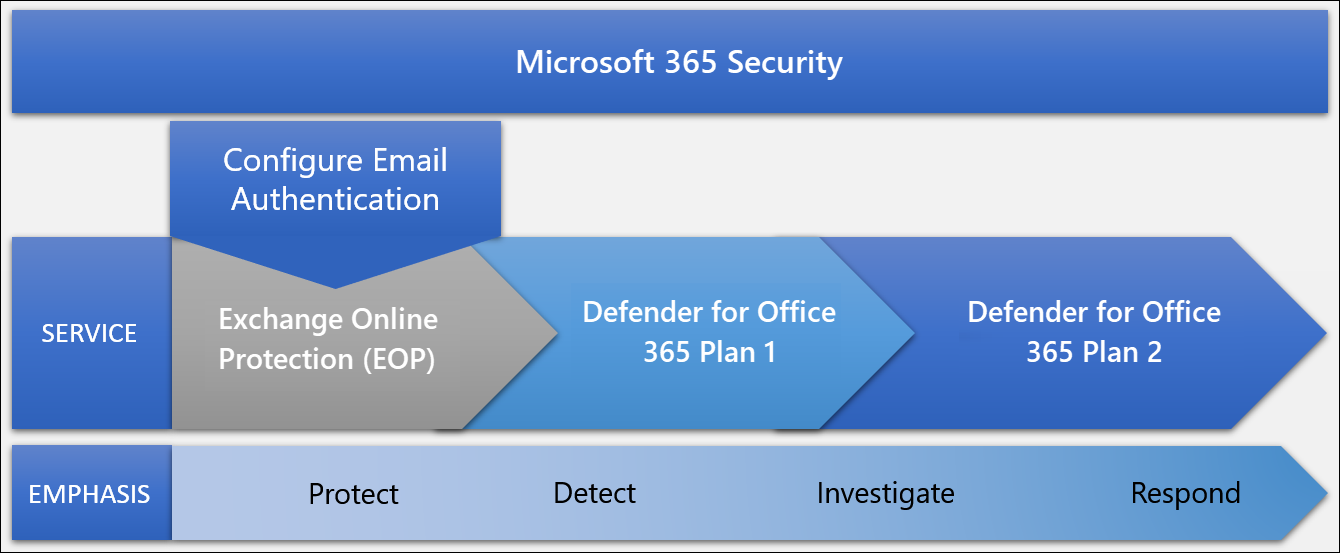
All Microsoft 365 plans include Exchange Online Protection:
- Spam filtering — blocks bulk and unsolicited email
- Malware filtering — scans attachments for known malware signatures
- Anti-phishing — detects impersonation of well-known domains
- Spoof intelligence — flags emails from domains that fail SPF/DKIM authentication
EOP provides baseline protection but has limitations: it primarily catches known threats and high-confidence spam. Sophisticated phishing and novel malware may pass through.
Google Workspace — Gmail Security
Google Workspace includes:
- Spam and phishing filtering with machine learning
- Attachment scanning
- Pre-delivery message scanning
- Link rewriting and click-time verification (in Business Plus and above)
Gmail's spam filtering is among the strongest in the industry. However, like EOP, it is optimised for known threats.
The Essential Configuration: SPF, DKIM, DMARC
The most impactful email security configuration for Philippine businesses — and the one most frequently missing — is proper email authentication. Without it, anyone on the internet can send email appearing to come from your domain.
SPF (Sender Policy Framework): Tells receiving mail servers which servers are authorised to send email from your domain. Add a TXT record to your DNS:
v=spf1 include:spf.protection.outlook.com -all  (for M365)
v=spf1 include:_spf.google.com -all  (for Google Workspace)
DKIM (DomainKeys Identified Mail): Adds a cryptographic signature to outgoing emails. Recipients verify the signature to confirm the email was not altered in transit and actually originated from your domain. Enable in M365 Admin > Security > Email Authentication, or Google Workspace Admin > Gmail > Authenticate email.
DMARC (Domain-based Message Authentication): Tells receiving servers what to do when an email fails SPF or DKIM — quarantine it (send to spam) or reject it. Also provides reports of who is sending email using your domain.
Start with p=none for 30 days to receive reports without affecting delivery:
v=DMARC1; p=none; rua=mailto:dmarc@yourcompany.com.ph
Then move to p=quarantine and finally p=reject once you have confirmed all legitimate sending services are properly authenticated.
The Philippine business case for DMARC p=reject: Once your domain has a strict DMARC policy, attackers cannot send BEC emails that spoof your domain to your clients and suppliers. This protects your brand as much as your inbox.
When to Add Microsoft Defender for Office 365
Microsoft Defender for Office 365 Plan 1 is included in Microsoft 365 Business Premium (and available as a standalone add-on for approximately ₱300–400/user/month). It adds — and works well combined with data loss prevention controls to stop sensitive data leaking via email:
Safe Attachments
Every email attachment is opened in an isolated sandbox (detonation chamber) before delivery. If the attachment executes malicious behaviour — drops a file, makes network connections, modifies registry — the email is quarantined.
Safe Attachments catches zero-day malware (threats not yet in signature databases) that EOP misses. For Philippine businesses receiving financial documents, contracts, and logistics paperwork regularly — all common phishing vectors — Safe Attachments is high-value protection.
Safe Links
Every URL in every email is rewritten to route through Microsoft's threat intelligence service. When a user clicks a link, Microsoft checks it in real time against known malicious sites. If the site has been flagged as malicious after the email was delivered, the user is blocked from accessing it.
This addresses a key attacker technique: sending links to clean sites that later redirect to malicious content — a pattern that bypasses filtering at delivery time.
Anti-Phishing with Impersonation Protection
Configure your executives and key contacts as "protected users." Defender for Office 365 flags emails that impersonate these names, even when the sender domain is different — catching the "CEO display name, random domain" BEC pattern.
Third-Party Email Gateways: When They Make Sense
For Philippine organisations with very high email security requirements — financial institutions, healthcare organisations handling patient data, BPO firms processing client PII — third-party Secure Email Gateways (SEGs) provide an additional filtering layer on top of Microsoft 365 or Google Workspace.
Leading options in the Philippine market:
| Product | Vendor | Key Strength |
|---|---|---|
| Proofpoint Essentials | Proofpoint | BEC-specific AI detection |
| Barracuda Email Security | Barracuda | Archive + filtering combined |
| Mimecast | Mimecast | Impersonation protection, brand protection |
| SpamTitan | TitanHQ | Cost-effective, strong spam filtering |
Third-party SEGs add cost (typically USD $3–8/user/month) and complexity. For most Philippine SMEs, Microsoft Defender for Office 365 Plan 1 (included in Business Premium) provides sufficient protection without the additional vendor relationship.
Anti-BEC Controls: Beyond Filtering
Email filtering alone does not stop all BEC. Process controls are equally important:
Payment verification protocol: Any payment instruction received via email — new bank account details, wire transfer requests, urgent payment authorisations — must be verified via a secondary channel (phone call to a known number, in-person confirmation). This process should be written policy, not discretionary.
Dual-authorisation for payments: All payments above a defined threshold (e.g., ₱50,000) require approval from two authorised signatories. This limits the damage from a single compromised account.
Supplier bank account change policy: New or changed supplier bank account details require direct verification with the supplier via a phone number from your existing records, not the number provided in the request.
These process controls are free to implement and prevent the most financially damaging BEC scenarios.
If your Philippine organisation needs help configuring email authentication, deploying Microsoft Defender for Office 365, or reviewing your email security posture, get in touch.
Related reading: Conditional Access Policies for M365 · Data Loss Prevention for Philippine Businesses · Ransomware Protection for Philippine SMEs
Talk to our Cloud & I.T. team →