Azure Virtual Network: Setting Up Secure Cloud Networking for Philippine Enterprises
When a Philippine enterprise deploys virtual machines, databases, or application services in Azure, the default configuration exposes those resources to the public internet via public IP addresses. For development environments, this may be acceptable. For production systems handling business data — customer records, financial data, employee information — it is not.
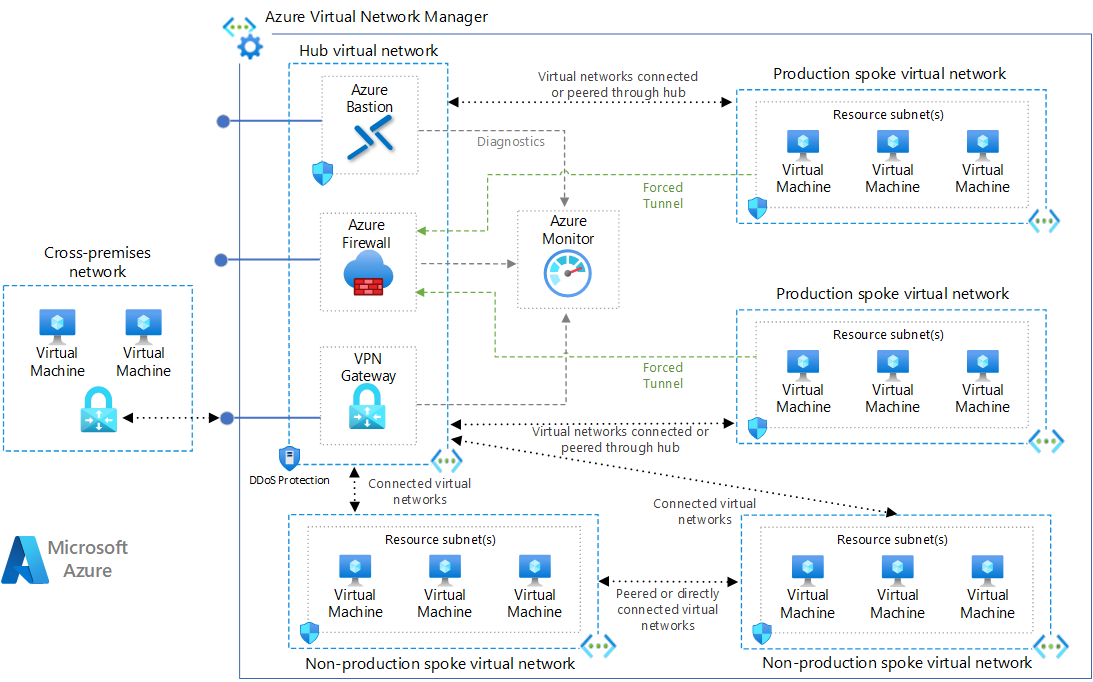
Azure Virtual Network (VNet) creates an isolated, private network in Azure where resources communicate privately, access is controlled at the network level via Network Security Groups (NSGs), and connectivity to on-premise Philippine office networks is established via VPN or ExpressRoute.
What Azure VNet Provides
Network isolation: Resources in a VNet are isolated from the public internet by default. They communicate privately with each other and only communicate externally through explicitly configured rules.
Subnet segmentation: A VNet is divided into subnets — separate network segments for different tiers of the application (web tier, application tier, database tier) or different teams. Traffic between subnets is controlled via NSGs.
Access control: Network Security Groups (NSGs) define inbound and outbound traffic rules for each subnet — which ports, from which sources, are allowed.
Private DNS: Azure Private DNS Zones allow Azure services to resolve to private IP addresses rather than public endpoints.
Hybrid connectivity: VPN Gateway and Azure ExpressRoute connect the Azure VNet back to the Philippine on-premise network, creating a unified private network across cloud and on-premise.
Designing a VNet for Philippine Enterprises
Address Space Planning
A VNet requires an IP address range (CIDR block). Standard private RFC 1918 ranges:
- 10.0.0.0/8 — largest range; 16 million addresses
- 172.16.0.0/12 — medium range
- 192.168.0.0/16 — smallest; commonly used in home/small office
Philippine enterprise recommendation: For a production VNet, use 10.X.0.0/16 where X is unique to the Azure region. This provides 65,536 addresses — more than sufficient for most Philippine enterprises — and leaves room to connect multiple VNets (for different environments or business units) in the same RFC 1918 space without overlap.
Example allocation:
- Production VNet: 10.0.0.0/16 (Southeast Asia — Singapore region)
- Development VNet: 10.1.0.0/16 (same or different region)
- On-premise network: 192.168.1.0/24 (typical Philippine office network)
Critical rule: On-premise and Azure VNet address ranges must not overlap — if both use 192.168.1.0/24, VPN routing cannot function correctly.
Subnet Design
Subnets segment the VNet into functional zones. Standard subnet design for a three-tier Philippine enterprise application:
| Subnet | Address Range | Purpose |
|---|---|---|
| AzureBastionSubnet | 10.0.0.0/27 | Required name for Azure Bastion (secure admin access) |
| GatewaySubnet | 10.0.1.0/27 | Required name for VPN/ExpressRoute Gateway |
| web-subnet | 10.0.2.0/24 | Web servers, load balancers (internet-facing) |
| app-subnet | 10.0.3.0/24 | Application servers, API gateways (private) |
| data-subnet | 10.0.4.0/24 | Databases, storage (most restricted) |
| mgmt-subnet | 10.0.5.0/27 | Management tools, monitoring (admin access only) |
Sizing note: /27 subnets provide 32 addresses (27 usable after Azure reserves 5). /24 subnets provide 256 addresses (251 usable). Size subnets for future growth — you cannot easily resize a VNet subnet after resources are deployed in it.
Network Security Groups (NSGs)
NSGs are the primary access control mechanism in Azure VNet. Each NSG contains ordered rules that allow or deny traffic based on:
- Source/destination IP address or CIDR range
- Source/destination port
- Protocol (TCP, UDP, Any)
- Direction (inbound or outbound)
Standard NSG rules for Philippine enterprise:
web-subnet NSG (internet-facing):
- Allow inbound port 443 (HTTPS) from Any — for web traffic
- Allow inbound port 80 (HTTP) from Any — redirect to HTTPS
- Deny all other inbound from internet
- Allow outbound to app-subnet on application port
app-subnet NSG (private):
- Allow inbound from web-subnet on application port
- Allow inbound from mgmt-subnet on management ports (SSH 22, RDP 3389)
- Deny all inbound from internet
- Allow outbound to data-subnet on database port (SQL 1433, MySQL 3306)
data-subnet NSG (most restricted):
- Allow inbound from app-subnet on database port only
- Deny all other inbound
- Deny outbound to internet
Hybrid Connectivity: Connecting Azure to Philippine On-Premise Networks
For Philippine enterprises that have on-premise servers, Active Directory, or other infrastructure that Azure workloads need to communicate with, hybrid connectivity is required.
Azure VPN Gateway (Site-to-Site VPN)
VPN Gateway creates an encrypted IPsec/IKE VPN tunnel between Azure VNet and the Philippine on-premise network. For organisations evaluating disaster recovery alongside hybrid connectivity, see our guide on Azure Site Recovery.
Setup overview:
- Deploy a VPN Gateway in the GatewaySubnet (takes 30–45 minutes to provision)
- Configure a Local Network Gateway in Azure representing the on-premise network (the Philippine office's public IP and the on-premise address ranges)
- Configure the on-premise VPN device (Cisco, Fortinet FortiGate, Juniper, or compatible router) to connect to the Azure VPN Gateway
- Create the VPN connection linking the two gateways
VPN Gateway SKUs for Philippine enterprise:
- VpnGw1: Up to 650 Mbps aggregate throughput — suitable for most Philippine SMEs
- VpnGw2: Up to 1 Gbps — for higher-bandwidth requirements
Latency: VPN from a Philippine on-premise network to Azure Singapore region: typically 5–20ms round-trip. Acceptable for hybrid applications.
Cost: VPN Gateway (VpnGw1): approximately USD $140/month (Southeast Asia region)
Azure ExpressRoute (Private Dedicated Connection)
ExpressRoute provides a private, dedicated circuit from the Philippine on-premise network to Azure — not over the public internet. This eliminates VPN overhead and provides higher, more consistent bandwidth.
Available ExpressRoute providers in the Philippines: PLDT Global, Globe Business, and other carriers with ExpressRoute connectivity via the SingTel and KDDI exchange points in Singapore.
When to choose ExpressRoute over VPN:
- Bandwidth requirements above 1 Gbps
- Latency-sensitive workloads (database mirroring, real-time replication)
- Compliance requirements for private network connectivity (some regulated industries require no public internet transit)
- Predictable, SLA-backed network performance
Cost: ExpressRoute circuits start at approximately USD $55/month for 50 Mbps (metered); USD $370/month for 200 Mbps (unmetered). Plus carrier circuit costs from the Philippine ISP.
Azure Bastion: Secure Admin Access Without Public RDP/SSH
A common misconfiguration in Azure deployments: opening RDP (port 3389) or SSH (port 22) to the internet for admin access. Attackers continuously scan for open RDP/SSH endpoints and attempt brute-force access.
Azure Bastion provides browser-based RDP/SSH access to Azure VMs without any public endpoint — the connection goes through the Azure portal over HTTPS, authenticated with Entra ID.
Setup: Deploy Bastion in the AzureBastionSubnet. No public IP required on the VM. NSG rules block all direct RDP/SSH from the internet.
Cost: Azure Bastion Developer (basic): approximately USD $15/month. Standard SKU: USD $140/month (with additional features).
VNet Peering: Connecting Multiple Azure VNets
If a Philippine enterprise has multiple Azure VNets (production, development, shared services), VNet peering connects them privately:
- No gateway required
- Traffic stays on Microsoft's backbone network
- Low latency and high bandwidth between peered VNets
- Cost: approximately USD $0.01/GB transferred
Common use case: Shared services VNet (containing Active Directory domain controllers, monitoring tools, shared logging) peered with production and development VNets.
For Philippine enterprises designing or reviewing their Azure Virtual Network architecture, get in touch.
Related reading: Disaster Recovery with Azure Site Recovery · Microsoft Entra ID for Philippine SMEs · Zero Trust Security for Philippine Businesses
Talk to our Cloud & I.T. team →