FortiGate Buyer's Guide for Philippine Businesses: Which Model and What It Actually Costs
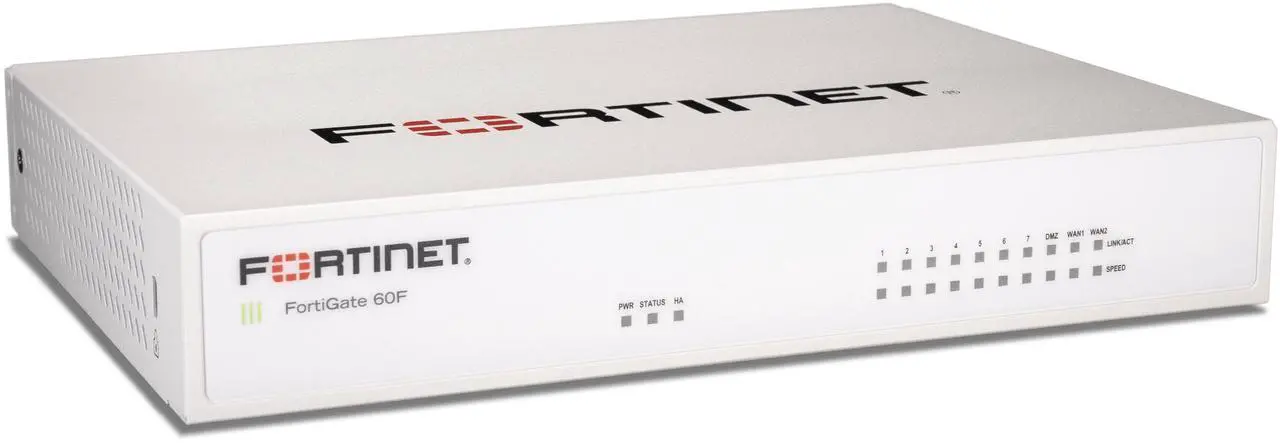
FortiGate is the most widely deployed Next-Generation Firewall (NGFW) in Philippine enterprise environments — present in BSP-regulated financial institutions, BPO operations, government agencies, and SME head offices. The model range is extensive and the subscription model means the hardware price is only part of the total cost. Understanding the sizing methodology and subscription structure before purchasing avoids the most expensive mistakes.
The FortiGate Model Range (Philippine Context, 2026)
Desktop Series — SME and Branch Offices
FortiGate 40F
- NGFW throughput: 1 Gbps · IPS: 1.4 Gbps · NGFW concurrent sessions: 700,000
- Interfaces: 5× GE · no SFP
- Philippine street price (hardware only): ₱28,000–35,000
- Best for: retail branches, 20–50 user sites without high-bandwidth requirements
FortiGate 60F / 61F
- NGFW throughput: 1.5 Gbps · IPS: 1.8 Gbps · concurrent sessions: 1,000,000
- Interfaces: 10× GE · 61F adds 1× SFP
- Philippine street price: ₱45,000–60,000
- Best for: SME head offices, 50–100 users, single-site deployment
FortiGate 80F / 81F
- NGFW throughput: 2.6 Gbps · IPS: 2.3 Gbps · concurrent sessions: 1,500,000
- Interfaces: 10× GE + 2× SFP
- Philippine street price: ₱70,000–90,000
- Best for: SME offices with 100–200 users, higher internet bandwidth requirements
FortiGate 100F
- NGFW throughput: 10 Gbps · IPS: 5 Gbps · concurrent sessions: 1,500,000
- Interfaces: 22× GE + 4× SFP + 2× SFP+
- Philippine street price: ₱150,000–200,000
- Best for: mid-market head offices, 200–500 users, dual-WAN with load balancing
Rack-Mount Series — Mid-Market and Enterprise
FortiGate 200F
- NGFW throughput: 27 Gbps · IPS: 20 Gbps · concurrent sessions: 3,000,000
- 1U rack-mount · 18× GE + 8× SFP + 4× SFP+
- Philippine street price: ₱350,000–500,000
- Best for: enterprise branch aggregation, 500–1,500 users
FortiGate 400F / 401F
- NGFW throughput: 80 Gbps
- Best for: data centres, large enterprise sites
Sizing: The Three Numbers That Matter
Most FortiGate sizing mistakes come from choosing based on user count alone. The three correct inputs:
1. NGFW Throughput
NGFW throughput is the sustained throughput when all security features are enabled — application control, IPS, SSL inspection, antivirus. It is significantly lower than the "firewall throughput" figure that manufacturers highlight in marketing.
Rule of thumb: Average Philippine office user generates 5–15 Mbps of internet traffic with all cloud apps active. For 100 users at 10 Mbps average: 1 Gbps total — the FortiGate 60F (1.5 Gbps NGFW) covers this with margin.
SSL inspection penalty: Enabling full SSL/TLS inspection (decrypting HTTPS traffic for IPS scanning) reduces throughput by approximately 30–50%. If your organisation requires SSL inspection (BPO compliance, financial services), size up accordingly.
2. Concurrent Sessions
Each TCP connection is one session. A user with 20 browser tabs, Teams, email, and cloud apps active may hold 500–2,000 concurrent sessions. For 100 users: 100,000–200,000 concurrent sessions minimum.
The FortiGate 60F's 1,000,000 session capacity is significantly more than needed for 100 users — concurrent sessions typically becomes a constraint only at 500+ user sites.
3. New Sessions Per Second
High-transaction environments (call centres, trading floors, BPO with many short HTTP transactions) generate high new-sessions-per-second load. The FortiGate 60F handles 35,000 new sessions/second — sufficient for most Philippine SME deployments.
Subscription Model: What You Actually Pay
FortiGate hardware without an active subscription is a basic stateful firewall only — no IPS, no application control, no SSL inspection, no antivirus. The security value requires active FortiGuard subscriptions.
Key Subscriptions
| Bundle | Includes | Annual Cost (60F) |
|---|---|---|
| UTM Bundle | IPS + Application Control + Web Filtering + Antivirus + Botnet | ₱25,000–35,000/year |
| Enterprise Bundle | UTM + SD-WAN + Security Rating + IoT Detection | ₱40,000–55,000/year |
| FortiCare Support | TAC support, firmware access, hardware replacement | ₱8,000–15,000/year |
3-year TCO for FortiGate 60F (hardware + UTM + FortiCare):
- Hardware: ₱50,000
- 3 years UTM: ₱90,000
- 3 years FortiCare: ₱36,000
- Total: ₱176,000 (~₱59,000/year)
This is the correct number to compare against competing solutions — not the hardware price alone.
What Happens at Subscription Expiry
When a FortiGuard subscription expires, the corresponding security feature continues to use the last downloaded signature database — but receives no updates. IPS signatures become stale (new CVEs undetected), web filter database becomes stale (new malicious sites unblocked). For Philippine organisations subject to BSP or NPC requirements, expired subscriptions create compliance gaps.
FortiGate vs Alternatives for Philippine Deployments
| Vendor | Philippine Position | Strengths | Weaknesses |
|---|---|---|---|
| Fortinet FortiGate | Dominant enterprise/SME | Best price-performance at SME tier; strong local support; FortiOS deep feature set | Subscription dependency; complex for small IT teams |
| Palo Alto Networks | Upper enterprise | Gold standard for advanced threat prevention | Significantly higher cost; less Filipino reseller depth |
| Cisco Meraki MX | Enterprise/cloud-managed | Cloud-managed simplicity; Teams integration | Higher TCO; limited offline functionality |
| Sophos XGS | SME | Excellent UTM at SME price; Sophos Central management | Smaller Philippine reseller network |
| pfSense/OPNsense | Cost-sensitive SME | Zero hardware cost; open source | Requires in-house expertise; no vendor support |
For Philippine SME deployments requiring a proven NGFW with local support, FortiGate 60F or 80F with UTM bundle is the baseline recommendation. See our enterprise networking refresh guide and FortOS 8 guide for configuration context.
Common Philippine Deployment Mistakes
Buying hardware without subscriptions: The FortiGate box without active FortiGuard subscriptions is not a security device — it's a router. Budget for subscriptions from day one.
Under-sizing for SSL inspection: If your compliance requirements include HTTPS traffic inspection, size the firewall for SSL inspection throughput, not standard NGFW throughput.
Single WAN without failover: Philippine internet connectivity is not reliable enough to run a single-WAN deployment at any business-critical site. The FortiGate 60F and above support dual-WAN with SD-WAN load balancing and automatic failover — always configure both.
Skipping FortiCare: Hardware replacement SLA matters during typhoon season. Without FortiCare, a failed unit waits for standard import and distribution timelines.
Related reading: Enterprise networking refresh guide · FortOS 8 enterprise security · Zero Trust security Philippines · FortiGate 100F end-of-sale upgrade
For Philippine organisations specifying FortiGate — sizing, licensing, and deployment — available through Technica Solutions Inc., get in touch.
Talk to our I.T. Hardware team →