Dell Latitude vs HP EliteBook vs Lenovo ThinkPad: Philippine Business Laptop Buyers' Guide 2026
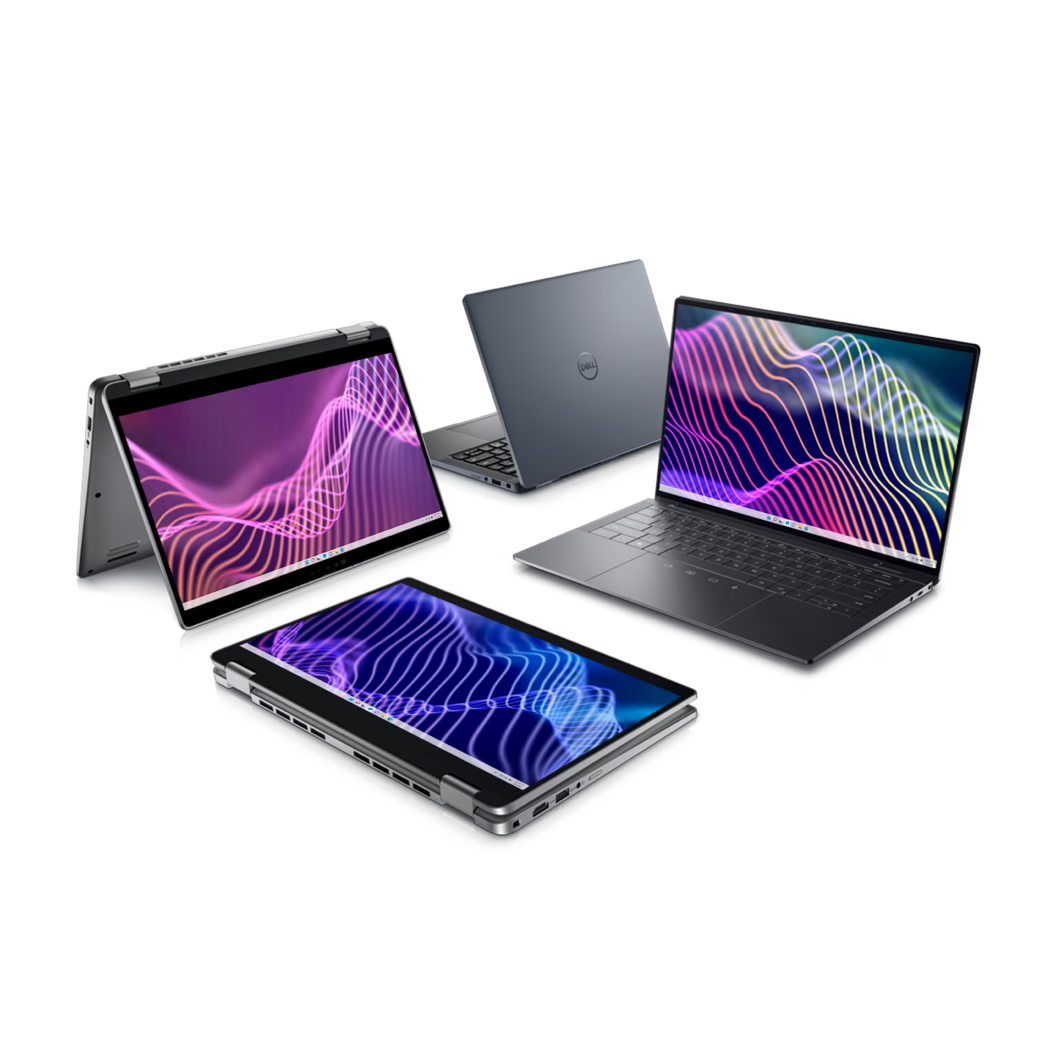
When you're provisioning business laptops for a Philippine enterprise—whether it's 10 units for a growing startup or 500 for a BPO fleet refresh—the choice usually narrows to three product lines: Dell Latitude, HP EliteBook, and Lenovo ThinkPad.
All three are purpose-built for commercial deployments. They share core enterprise features: vPro manageability, TPM 2.0 security, mil-spec durability testing, and multi-year warranty options. The differences are in build philosophy, management ecosystems, local support quality, and price positioning.
This guide compares the three lines across the criteria that matter for Philippine IT managers: durability, performance tiers, manageability, warranty, and total cost of ownership.
Understanding the Business Laptop Tiers
Each vendor segments their business laptop portfolio into tiers. Here's how the three product lines map:
| Tier | Dell | HP | Lenovo |
|---|---|---|---|
| Premium | Latitude 9000 Series | EliteBook 800 G11 | ThinkPad X1 Carbon/Yoga |
| Mainstream | Latitude 7000 Series | EliteBook 600 G11 | ThinkPad T Series |
| Value | Latitude 5000 Series | ProBook 400 G11 | ThinkPad E/L Series |
| Ultra-Mobile | Latitude 7000 2-in-1 | EliteBook x360 | ThinkPad X13/X1 Nano |
For most Philippine enterprises, the mainstream tier (Latitude 7000, EliteBook 600, ThinkPad T) offers the best balance of build quality, performance, and pricing. Premium tiers target executives and mobile power users; value tiers fit call centre agents, kiosk deployments, and intern fleets.
If you're evaluating refurbished options to control fleet refresh costs, see: Refurbished vs New Laptop in the Philippines: A 2026 Buyer's Guide.
Dell Latitude: Standardization and Global Fleet Consistency
Dell Latitude is the dominant business laptop in Philippine corporate IT—particularly in multinationals, BPOs, and enterprises with global parent companies. The reason is standardization: Dell's internal component layouts, driver packages, and firmware update cadence are highly consistent across generations.
Build and Design
Latitude laptops use aluminum chassis (7000/9000 series) or carbon fiber-reinforced polymer (5000 series). Keyboards are spill-resistant (up to 120ml on premium models). All models pass MIL-STD-810H testing for drop, vibration, humidity, and temperature extremes—relevant for field deployments in provincial offices.
The Latitude design language prioritizes function over form—thick bezels, generous port selection (USB-A, HDMI, Ethernet on most models), and accessible internals. IT teams can swap RAM, SSDs, and batteries without removing the entire bottom cover.
Performance and Configurations
Dell offers Intel (Core Ultra) and AMD (Ryzen Pro) processor options across the Latitude line. For 2026 deployments, typical configurations:
- Latitude 5440 (14", mainstream): Intel Core Ultra 5/7, 16GB RAM, 256GB SSD—₱65,000-₱85,000
- Latitude 7440 (14", premium): Intel Core Ultra 7, 32GB RAM, 512GB SSD, FHD+ display—₱95,000-₱115,000
- Latitude 9440 (14", executive): Intel Core Ultra 7, 32GB LPDDR5, 1TB SSD, QHD+ touchscreen—₱145,000-₱165,000
Battery life on Latitude 7000/9000 series: 12-16 hours (typical office use, 50% brightness). The 5000 series delivers 8-12 hours.
Management and Security
Dell Latitude includes Intel vPro (or AMD Pro on Ryzen models) for out-of-band management—you can reimage, update firmware, or troubleshoot a laptop even if the OS won't boot. This is critical for distributed IT deployments (regional offices, work-from-home fleets).
Dell Optimizer is pre-installed on Latitude 7000/9000—AI-based tuning for application performance, battery life, and audio/video quality during video calls. For IT admins, Dell Command | Configure and Dell Command | Update provide scriptable BIOS configuration and driver updates across the fleet.
BIOS-level security: Dell Latitude uses Dell SafeBIOS with automatic recovery from BIOS corruption or ransomware attacks targeting firmware. TPM 2.0 is standard; some models offer ControlVault 3 (dedicated security processor separate from the TPM).
For SMEs evaluating laptop security in the context of zero trust architecture, see: Zero Trust Security for Philippine Businesses: What It Means and How to Implement It.
Warranty and Support in the Philippines
Dell offers 3-year ProSupport (standard business warranty) and ProSupport Plus (accidental damage coverage). Philippine support operates from Dell's Manila service centre—on-site next-business-day service covers Metro Manila, Cebu, Davao, and select provincial cities.
Parts availability: Dell maintains local inventory for Latitude batteries, keyboards, and displays. Turnaround for depot repairs: 5-7 business days (Metro Manila), 10-14 days (provincial).
HP EliteBook: Premium Build and Manageability
HP EliteBook targets the same buyer as Dell Latitude, but with a stronger emphasis on premium materials, lighter weight, and integrated endpoint security. EliteBook is the choice for Philippine enterprises where laptop aesthetics matter—law firms, C-suite deployments, client-facing roles.
Build and Design
EliteBook 800 G11 series uses CNC-machined aluminum chassis. Weight: 1.2-1.4kg for 14" models—lighter than equivalent Latitude 7000 laptops. HP prioritizes thin bezels and modern design; the trade-off is fewer legacy ports (you'll need dongles for VGA/Ethernet on some models).
Keyboards feature backlit keys (standard on 800 series), HP Sure View Reflect (integrated privacy screen on select models), and spill-resistant design (up to 200ml). Like Dell, all EliteBook models pass MIL-STD-810H durability testing.
Performance and Configurations
HP offers Intel (Core Ultra) and AMD (Ryzen AI Pro) options. For 2026 Philippine deployments:
- EliteBook 640 G11 (14", mainstream): Intel Core Ultra 5/7, 16GB RAM, 256GB SSD—₱70,000-₱90,000
- EliteBook 840 G11 (14", premium): Intel Core Ultra 7, 32GB RAM, 512GB SSD, WUXGA display—₱100,000-₱120,000
- EliteBook 1040 G11 (14", executive): Intel Core Ultra 7, 32GB LPDDR5, 1TB SSD, WUXGA touch—₱155,000-₱175,000
Battery life on EliteBook 800 series: 14-18 hours (HP claims; real-world usage closer to 12-14 hours). The 600 series delivers 10-12 hours.
Management and Security
HP's differentiation is HP Wolf Security—a suite of hardware-enforced security features included in EliteBook:
- HP Sure Start — BIOS-level self-healing (recovers from firmware attacks without IT intervention)
- HP Sure Sense — AI-based malware detection that runs below the OS
- HP Sure Click — hardware-enforced isolation for web browsers and email attachments
- HP Sure View Reflect — integrated privacy screen (physically blocks side viewing angles)
For fleet management, HP uses HP Client Management (cloud-based) and HP Manageability Integration Kit (SCCM/Intune integration). Like Dell, EliteBook supports Intel vPro for remote management and out-of-band troubleshooting.
If you're deploying Microsoft Intune for mobile device management, see: Microsoft Intune for Philippine SMEs: Mobile Device Management Without On-Premises Infrastructure (coming soon).
Warranty and Support in the Philippines
HP offers 3-year Care Pack (standard warranty) and Accidental Damage Protection (ADP). Philippine support operates from HP's ASP network—on-site service covers Metro Manila, Cebu, and Davao. Provincial coverage is depot-based.
Parts availability: HP local inventory covers batteries and common FRUs (field-replaceable units). Depot repair turnaround: 5-10 business days (varies by location).
Lenovo ThinkPad: Legendary Keyboard and Value Pricing
Lenovo ThinkPad is the choice for Philippine IT managers who prioritize typing comfort, upgradeability, and cost efficiency. ThinkPad has the strongest reputation for keyboard quality—the TrackPoint (red pointing stick) and deep key travel are polarizing, but users who prefer them are loyal.
Build and Design
ThinkPad uses carbon fiber-reinforced plastic (T/X1 series) or glass fiber-reinforced plastic (E/L series). The design is utilitarian—thick bezels, matte black finish, minimal branding. Like Dell and HP, ThinkPad passes MIL-STD-810H testing.
Keyboard quality: ThinkPad keyboards have 1.5mm key travel (deeper than Dell/HP at 1.3-1.4mm) and curved keycaps. For users typing 6+ hours per day—writers, programmers, data entry—ThinkPad keyboards reduce fatigue.
Upgradeability: ThinkPad T/L series laptops use socketed RAM (not soldered) and user-replaceable batteries on some models. This extends lifespan—you can upgrade to 64GB RAM or swap a degraded battery without replacing the entire laptop.
Performance and Configurations
Lenovo offers Intel (Core Ultra) and AMD (Ryzen Pro) options. For 2026 Philippine deployments:
- ThinkPad E14 Gen 6 (14", value): Intel Core Ultra 5, 16GB RAM, 256GB SSD—₱55,000-₱70,000
- ThinkPad T14 Gen 5 (14", mainstream): Intel Core Ultra 7, 16GB RAM, 512GB SSD—₱80,000-₱95,000
- ThinkPad X1 Carbon Gen 12 (14", premium): Intel Core Ultra 7, 32GB LPDDR5, 1TB SSD, OLED display—₱135,000-₱155,000
Battery life on ThinkPad T/X1 series: 12-16 hours. The E series delivers 8-12 hours.
Management and Security
ThinkPad includes Intel vPro (or AMD Pro) and Lenovo ThinkShield security features:
- Self-Healing BIOS — automatic recovery from firmware corruption
- Firmware TPM (fTPM) or discrete TPM 2.0 (model-dependent)
- ThinkPad PrivacyGuard — integrated electronic privacy screen (premium models)
- Webcam ThinkShutter — physical webcam cover (all models)
For fleet management, Lenovo offers Lenovo Vantage Enterprise (free) and Lenovo XClarity Administrator (data centre-grade management). Integration with SCCM, Intune, and Jamf is supported.
Warranty and Support in the Philippines
Lenovo offers 3-year onsite warranty (standard) and Accidental Damage Protection (ADP). Philippine support operates from Lenovo's ASP network—coverage in Metro Manila, Cebu, Davao, and select provincial cities.
Parts availability: Lenovo local inventory is strong for ThinkPad T/X1 series; E/L series parts may require 10-14 day lead times. Depot repair turnaround: 7-10 business days.
Side-by-Side Comparison
| Feature | Dell Latitude | HP EliteBook | Lenovo ThinkPad |
|---|---|---|---|
| Build Material | Aluminum/carbon fiber | CNC aluminum | Carbon/glass fiber |
| Weight (14" model) | 1.4-1.6kg | 1.2-1.4kg | 1.3-1.5kg |
| Keyboard Travel | 1.3mm | 1.3mm | 1.5mm |
| Upgradeability | Medium (some models) | Low (soldered RAM) | High (socketed RAM) |
| BIOS Security | SafeBIOS | Sure Start | Self-Healing BIOS |
| Privacy Screen | Optional add-on | Sure View (integrated) | PrivacyGuard (premium) |
| Battery Life | 12-16 hours | 14-18 hours (claimed) | 12-16 hours |
| Philippine Support | Excellent (Dell direct) | Good (ASP network) | Good (ASP network) |
| Price (mainstream) | ₱65K-₱95K | ₱70K-₱100K | ₱55K-₱80K |
| Best For | Global consistency | Premium design | Value + keyboard |
All three lines support Thunderbolt 4, Wi-Fi 6E/7, Windows 11 Pro, and Intel vPro (or AMD Pro). The choice comes down to organizational priorities.
Decision Framework: Which Line to Choose
Choose Dell Latitude if:
- You're part of a global enterprise — Dell's standardization across regions simplifies global IT management
- You prioritize consistent driver/firmware updates — Dell's update cadence is predictable and well-documented
- You need strong local support — Dell's Philippine service centre provides faster turnaround than HP/Lenovo ASP networks
- You value port selection — Latitude laptops retain more legacy ports (USB-A, HDMI, Ethernet)
Choose HP EliteBook if:
- Premium design matters — client-facing roles, executive deployments, law firms
- You need integrated privacy screen — HP Sure View is the best implementation among the three vendors
- You want hardware-enforced security — HP Wolf Security is more comprehensive than Dell/Lenovo equivalents
- Weight is a priority — EliteBook 800 series is the lightest in the comparison
Choose Lenovo ThinkPad if:
- Budget is the primary constraint — ThinkPad E/L series offer the lowest entry price for business-grade laptops
- Keyboard quality matters — for typing-heavy roles (programmers, writers, data entry)
- You want upgradeability — socketed RAM and user-replaceable batteries extend lifespan
- You prefer utilitarian design — no branding, matte black, classic ThinkPad aesthetic
For most Philippine SMEs and BPO deployments, Dell Latitude 5000/7000 or Lenovo ThinkPad T Series deliver the best value. HP EliteBook is worth the premium for executive fleets and roles where laptop aesthetics affect client perception.
Total Cost of Ownership Considerations
Purchase price is only one component of TCO. Over a typical 4-year laptop lifecycle in a Philippine enterprise:
- Warranty/support costs: Dell and HP offer 3-year ProSupport/Care Pack; Lenovo's base warranty is also 3 years. Accidental damage protection adds ₱8,000-₱12,000 per unit.
- Downtime costs: Dell's local service centre reduces RMA turnaround by 30-40% vs HP/Lenovo ASP networks—critical for production roles (sales, customer service).
- Battery replacement: Non-user-replaceable batteries (HP EliteBook 800, some Dell Latitude 7000 models) require depot service—₱15,000-₱20,000 labor + parts vs ₱8,000 self-service on ThinkPad.
- Upgrade headroom: Soldered RAM (HP EliteBook, some Dell Latitude models) locks you into the purchased configuration; ThinkPad's socketed RAM allows 16→32GB or 32→64GB upgrades as workloads grow.
If you're managing a mixed Dell/HP server and storage environment, standardizing on Dell Latitude simplifies vendor management and support contracts. For hardware/software procurement strategies, see: Dell vs HPE vs Lenovo: Which Server Is Right for Your Philippine Business in 2026?.
Deployment and Imaging
All three vendors support Windows Autopilot for zero-touch deployment. For traditional imaging workflows:
- Dell: Use Dell Command | Deploy for driver injection and BIOS configuration
- HP: Use HP Image Assistant for driver pack creation
- Lenovo: Use Lenovo System Update Suite for driver and firmware automation
Integration with Microsoft Endpoint Manager (Intune/SCCM) is standard across all three. For Philippine enterprises moving to cloud-based device management, Autopilot eliminates the need for on-prem imaging infrastructure.
Related Reading
- Lenovo ThinkPad vs Dell Latitude: The Business Laptop Decision for Philippine IT in 2026
- Refurbished vs New Laptop in the Philippines: A 2026 Buyer's Guide
- HP vs Dell Workstation for Philippine Creative and Engineering Teams
Provisioning business laptops for your Philippine office or BPO? Technica Solutions Inc. is an authorized reseller for Dell, HP, and Lenovo with fleet pricing, on-site deployment support, and multi-year warranty management. Contact our I.T. Hardware team for volume quotations and demo units.