KVM Switch Buyer's Guide for Philippine Server Rooms: 2-Port to 16-Port, IP KVM, and What You Need
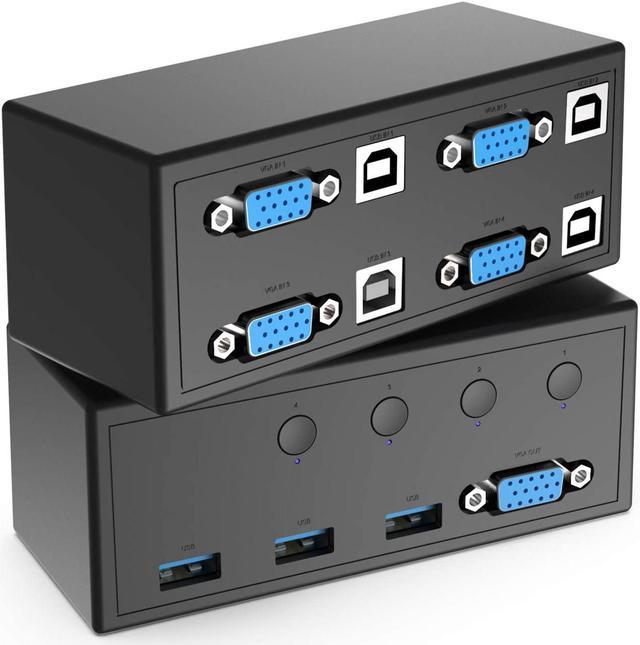
A KVM (Keyboard, Video, Mouse) switch solves a specific problem: you have multiple servers in a rack, each needing console access for installation, BIOS configuration, OS troubleshooting, and emergency recovery — but dedicating a keyboard, monitor, and mouse to each server is impractical in a rack environment.
For Philippine IT teams managing server rooms remotely — especially during evenings, weekends, or typhoon events when physical access is impossible — an IP KVM extends this further: it provides full keyboard, video, and mouse control over a network connection, from any location.
KVM Switch Types
Desktop/Local KVM Switch
A physical box that connects multiple computers to one set of peripherals via cable. Switching between computers is done via a button on the switch or a keyboard shortcut.
Best for: Small deployments (2–4 servers), non-rack environments, workstations in a shared lab or edit bay
Philippine price: ₱1,500–8,000 for 2–4 port units
Rack-Mount KVM Switch (1U)
Mounts in the rack and connects to rack servers via KVM cables. The console (keyboard, monitor, mouse) connects to the switch, which then switches between servers.
Variants:
- Remote-access KVM: Adds an IP-accessible interface so the connected console can be accessed over the network
- KVM drawer: Integrated 1U LCD + keyboard that slides into the rack — no separate monitor needed
Best for: Server rooms with 4–32 servers, rack deployments
Philippine price: ₱8,000–80,000 depending on port count and IP capability
IP KVM (KVM over IP)
A rack-mount KVM switch with a built-in web interface accessible over the network. The administrator connects via a web browser or dedicated client application from any location, sees the server's display, and types keyboard input — identical to being physically at the console.
Key capability: BIOS-level access — IP KVM works before the OS boots, allowing you to enter BIOS, select boot device, or recover from a failed OS installation without physical presence.
Best for: Philippine server rooms where IT staff are not always on-site, remote branch office server rooms, any deployment where physical access during emergencies is constrained
Philippine price: ₱25,000–150,000+ depending on port count and features
Port Count Selection
2–4 Port
For small offices or workstations. Cat5e/6 KVM cables, switching via front-panel button or keyboard shortcut (typically Scroll Lock × 2 then port number).
Models: Aten CS1762A (2-port HDMI USB), Aten CS1704 (4-port VGA USB)
8–16 Port
Standard for Philippine server rooms. Supports 8–16 physical servers with a single console interface. Many 8-port units support Cat5 KVM cables with small adapter dongles at the server end, reducing cable bulk in the rack.
Models: Aten CS1708i (8-port, IP), Aten CS1716i (16-port, IP)
32+ Port
For large data rooms. Typically uses a cascading architecture — a master KVM connects to slave KVM switches, each connecting to groups of servers.
Video Standard Matters: VGA vs HDMI vs DisplayPort
VGA (legacy but still common in Philippine server rooms)
VGA is still widely used in server rack environments because most server management interfaces (iDRAC, iLO, IPMI) output VGA, and Cat5 KVM cables use VGA at the server end. Most rack KVM switches support VGA.
Limitation: Maximum resolution of 1920×1200. For modern servers with HDMI or DisplayPort output, a VGA adapter works but limits resolution.
HDMI
Required for modern servers and for running dual-monitor desktop workstations through a KVM. HDMI KVM switches (Aten CS1762, Aten CS1782) support 4K at 30Hz or 1080p at 60Hz.
DisplayPort
Required for 4K at 60Hz and for connecting workstations with modern GPUs. DP KVM switches are more expensive but necessary for CAD workstations and video editing systems that need full 4K bandwidth.
Philippine server room recommendation: VGA or HDMI KVM for rack servers (matching the server's management port output). HDMI or DisplayPort KVM for workstation deployments.
IP KVM for Philippine Remote Access
The most valuable feature for Philippine deployments is IP KVM — specifically during:
Typhoon events: When IT staff cannot safely travel to the office, IP KVM allows BIOS recovery, OS reinstallation, and server reconfiguration from a safe location.
After-hours incidents: Server hangs or failed updates during off-hours can be resolved without dispatching staff for physical access.
Branch office servers: Servers in Cebu, Davao, or provincial locations can be managed from Manila without travel.
IP KVM Setup Requirements
- Dedicated management network: IP KVM should be on an out-of-band management VLAN, separate from production traffic and isolated from internet access
- Static IP or DHCP reservation: Ensure the IP KVM's management IP is stable and reachable from the management network
- SSL certificate: Configure HTTPS access with a valid certificate — IP KVM interfaces are typically accessed via a web browser; HTTP-only is a security risk
- MFA for remote access: Access to IP KVM should require MFA (most enterprise IP KVM units support RADIUS/LDAP authentication that integrates with your existing MFA system)
Recommended IP KVM Models (Philippine Market)
Aten KN1108VA (8-port IP KVM):
- 8 ports, Cat5 cables with small RJ45 adapter dongles at each server
- Web browser access (Java or HTML5 client)
- Virtual media: mount an ISO image remotely to boot the server from
- Philippine street price: ₱45,000–65,000
Aten KN2116VA (16-port IP KVM):
- 16 ports, dual IP access (two simultaneous administrators)
- BIOS-level access, virtual media
- Philippine street price: ₱80,000–110,000
iDRAC/iLO alternative: Modern Dell PowerEdge (iDRAC) and HPE ProLiant (iLO) servers have built-in IP KVM functionality — each server has its own dedicated management port. For deployments where most servers are Dell or HPE, the built-in iDRAC/iLO may be sufficient without a separate KVM switch. For mixed-vendor environments or older servers without iDRAC/iLO, a dedicated IP KVM switch is the correct solution.
Cable Management
KVM cables run from each server to the KVM switch. In a dense rack, poor cable management creates a maintenance nightmare. Best practice:
- Use Cat5/6 KVM cables (not VGA breakout cables) — these are thinner and more manageable
- Label both ends of every KVM cable with the server's hostname
- Route KVM cables in a separate cable manager from power cables
- Leave a service loop at the server end for slide-out maintenance without disconnecting
Related reading: Dell HPE rack server guide · Structured cabling Philippine office · Rack PDU Philippines · Data centre cooling Philippines
For Philippine server rooms specifying KVM switches and IP KVM — supply and configuration — available through Technica Solutions Inc., get in touch.
Talk to our I.T. Hardware team →