IP CCTV Storage Calculator: How Much NAS Do You Need for Philippine Office Surveillance?
The most common planning mistake in Philippine IP CCTV deployments is underestimating storage. IT teams order a NAS with "enough space" based on intuition rather than calculation, and discover three months after deployment that the system is overwriting footage after 10 days instead of the intended 30.
The correct approach is to calculate the required storage before purchasing hardware, accounting for camera count, resolution, frame rate, compression format, motion detection (which reduces storage but is sometimes disabled), and target retention period.
The Storage Calculation Formula
Daily storage (GB) = Bitrate (Mbps) × 86400 seconds × Camera count ÷ 8 ÷ 1024
Total storage (TB) = Daily storage (GB) × Retention days ÷ 1024
This gives the raw footage storage requirement. Add 20% overhead for NAS operating system, NVR software, logs, and database files.
Bitrate Reference Table
Bitrate depends on resolution, frame rate, and compression format (H.264 vs H.265). H.265 (HEVC) reduces bitrate by 40–50% versus H.264 at equivalent quality — always specify H.265/H.265+ cameras if storage is a concern.
H.264 typical bitrates (15fps, constant bitrate):
| Resolution | Bitrate |
|---|---|
| 2MP (1080p) | 2–4 Mbps |
| 4MP (1440p) | 4–8 Mbps |
| 5MP | 6–10 Mbps |
| 8MP (4K) | 10–20 Mbps |
H.265 typical bitrates (15fps, same quality):
| Resolution | Bitrate |
|---|---|
| 2MP (1080p) | 1–2 Mbps |
| 4MP (1440p) | 2–4 Mbps |
| 5MP | 3–5 Mbps |
| 8MP (4K) | 5–10 Mbps |
Motion detection / VBR (Variable Bitrate): Cameras recording only on motion (or using variable bitrate encoding) can reduce average storage by 50–70% in typical Philippine office environments where motion is intermittent. Use 30–50% of the constant bitrate figure as the average.
Worked Examples for Philippine Office Scenarios
Small Philippine Office (8 cameras, 2MP H.265, 15fps, 30 days)
- Bitrate: 1.5 Mbps average per camera
- Daily per camera: 1.5 × 86400 ÷ 8 ÷ 1024 = 15.8 GB/day
- Daily total (8 cameras): 15.8 × 8 = 126 GB/day
- 30-day total: 126 × 30 = 3.78 TB
- With 20% overhead: 4.5 TB required
Hardware: A 4-bay NAS with 2× 4TB NAS HDDs in RAID 1 provides 4TB usable — slightly short. Specify 2× 6TB for 6TB usable with RAID 1, or 4× 4TB in RAID 5 for 12TB usable with redundancy.
Medium Philippine Office (16 cameras, 4MP H.265, 15fps, 30 days)
- Bitrate: 3 Mbps average per camera
- Daily per camera: 3 × 86400 ÷ 8 ÷ 1024 = 31.6 GB/day
- Daily total (16 cameras): 31.6 × 16 = 506 GB/day
- 30-day total: 506 × 30 = 15.2 TB
- With 20% overhead: 18.2 TB required
Hardware: An 8-bay NAS with 4× 6TB HDDs in RAID 5 provides 18TB usable — matches the requirement. Or 4× 8TB for 24TB — adds headroom for retention period extension.
Large Philippine Office or BPO (32 cameras, 4MP H.265, 15fps, 30 days)
- Bitrate: 3 Mbps average per camera
- Daily total (32 cameras): 31.6 × 32 = 1,011 GB/day
- 30-day total: 30.3 TB
- With 20% overhead: 36.4 TB required
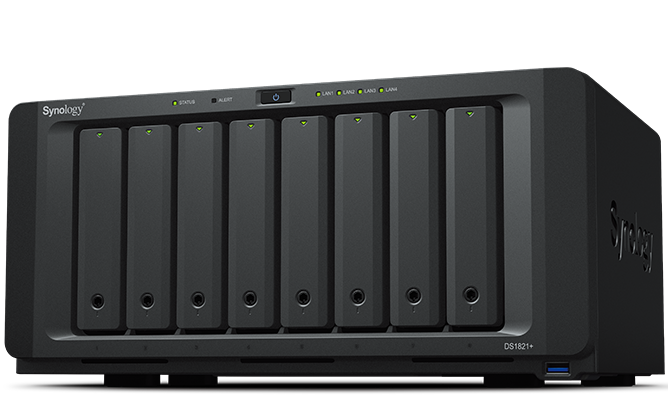
Hardware: Synology DS1821+ (8-bay) with 5× 10TB HDDs in RAID 6 provides 30TB usable — slightly short. Add a DX517 expansion unit for 5 additional bays, or specify 6× 10TB in RAID 6 (40TB usable).
NVR vs NAS: Storage Architecture Options
Dedicated NVR (Network Video Recorder)
A purpose-built NVR device handles video recording, camera management, and local playback. Most IP camera systems (Hikvision, Dahua, Uniview) are sold with compatible NVRs.
Advantages:
- Purpose-built, simpler setup
- Camera-to-NVR compatibility is guaranteed
- Typically includes HDMI output for local monitor display
Disadvantages:
- Storage is proprietary — cannot be repurposed for other workloads
- Limited expandability — when drives are full, options are constrained
- Backup of footage to secondary storage requires additional configuration
NAS with NVR Software (Synology Surveillance Station, QNAP QVR Pro)
A NAS running NVR software combines surveillance storage with the NAS's broader capabilities.
Advantages:
- Camera footage coexists with other NAS workloads (file sharing, backup)
- Expandable — add more drives or expansion units as needed
- Synology Surveillance Station includes 2 free camera licences; additional licences available
- Remote access via mobile app and web browser
- Integration with Synology's broader ecosystem (Hyper Backup for offsite footage backup)
Disadvantages:
- Camera compatibility must be verified (ONVIF standard covers most IP cameras)
- Higher upfront cost for a capable NAS vs a basic NVR
Philippine recommendation: For offices with 8–32 cameras needing 30-day retention and flexible storage expansion, a Synology NAS (DS923+, DS1522+, DS1821+) running Surveillance Station is the preferred architecture. For very large deployments (50+ cameras), a dedicated NVR or commercial VMS (Video Management System) may be more practical. See our Synology vs QNAP comparison to choose the right NAS platform, and our CCTV and IP camera setup guide for camera selection and placement.
Synology NAS Models for CCTV Storage
| Model | Bays | Max Raw | Recommended Config | Price Range |
|---|---|---|---|---|
| DS923+ | 4-bay | 64TB | 4× 10TB (30TB RAID 5) | ₱55,000–70,000 |
| DS1522+ | 5-bay | 80TB | 5× 10TB (40TB RAID 5) | ₱75,000–95,000 |
| DS1621+ | 6-bay | 96TB | 6× 12TB (60TB RAID 5) | ₱95,000–120,000 |
| DS1821+ | 8-bay | 128TB | 8× 16TB (96TB RAID 6) | ₱130,000–160,000 |
All available through Technica Solutions Inc., including drive selection and installation.
Retention Period: What Philippine Law and NPC Require
Under RA 10173 (Data Privacy Act), CCTV footage is personal data. Retention should be limited to what is necessary for the stated purpose (security monitoring):
- Standard retention: 30–90 days is the most common practice for Philippine commercial buildings
- Minimum meaningful retention: 7–14 days (allows investigation of incidents discovered shortly after occurrence)
- Maximum before NPC scrutiny: footage older than 90 days without a specific purpose (ongoing investigation, legal hold) may be considered excessive under the principle of data minimisation
Practical recommendation: 30-day retention for standard office CCTV. Retain specific incident footage indefinitely (copy to a separate storage location before the overwrite cycle reaches it).
Practical Setup Checklist
- Count all cameras with planned resolution and frame rate
- Choose H.265 encoding (reduces storage 40–50% vs H.264)
- Decide on motion detection only vs continuous recording (motion detection reduces average storage by 50–70%)
- Set target retention period (30 days recommended)
- Calculate storage using the formula above + 20% overhead
- Select NAS model and drive configuration with 30–40% headroom above calculated requirement
- Verify camera ONVIF compatibility with Synology Surveillance Station
- Configure RAID for redundancy (RAID 5 minimum for 4+ drives)
- Set up remote access and mobile app
- Configure alert on storage capacity threshold (80%)
For Philippine offices specifying CCTV storage — NAS hardware, drive configuration, and Synology Surveillance Station setup — available through Technica Solutions Inc., get in touch.
Related reading: CCTV and IP Camera Setup for Philippine Offices · Synology vs QNAP NAS: Which Is Right for Your Philippine SME? · PoE Switch Buyer's Guide for Philippine Offices
Talk to our I.T. Hardware team →