Patch Cable and Keystone Jack Guide: Cat6A Standards for Philippine Offices
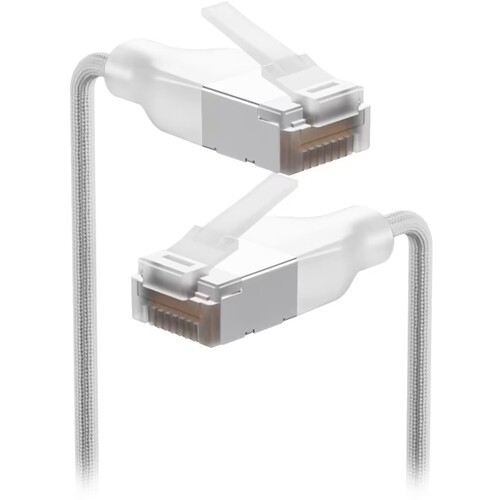
The structured cabling backbone of a Philippine office — the Cat6A runs from the patch panel to the wall outlet — can be correctly installed and then undermined by the wrong patch cable or improperly terminated keystone jack. These are the last-metre decisions that determine whether the cabling system performs to its rated specification.
For the full structured cabling design guide including cable routing and patch panel specification, see our structured cabling guide for Philippine offices.
Patch Cable Specification
Category Matching
The fundamental rule: Patch cables must match or exceed the category of the installed cabling. In a Cat6A infrastructure, all patch cables must be Cat6A.
What happens if you use Cat5e or Cat6 patch cables in a Cat6A system:
- The link negotiates to the lowest common denominator — Cat5e patch cables limit the link to Cat5e performance even if the horizontal run is Cat6A
- For 10GbE links (which Cat6A is designed to support at 100m), Cat5e patch cables cannot support 10GbE at all
- The physical RJ45 connectors are backwards compatible (Cat6A jacks accept Cat5e/6 plugs) but the electrical performance is not
Standard for 2026 Philippine office deployments: All patch cables — at the patch panel, at the wall outlet, and at the device — should be Cat6A. This applies even if the devices currently connected do not use 10GbE, because the infrastructure must support future 10GbE upgrades.
Cable Length
Patch cables have two separate length constraints:
Channel length constraint: The TIA-568 standard allows a maximum channel length of 100m (horizontal run + patch cables combined). If the horizontal run is 90m, the total patch cable allowance at both ends combined is 10m. In practice, most Philippine office runs are 30–60m, leaving ample patch cable allowance.
Patch panel to switch: In a server room or IDF (Intermediate Distribution Frame), the patch cable from the patch panel to the switch should be as short as practical — typically 0.5m to 2m. Long patch cables in the rack create cable management problems and increase the risk of accidental disconnection.
Device connections: For workstation and AP connections at the wall outlet, standard patch cable lengths are 1m, 2m, or 3m. Avoid excessively long patch cables — they create tangles, make cable tracing difficult, and can cause EMI issues in dense bundles.
Shielded vs Unshielded
For most Philippine office environments, UTP (Unshielded Twisted Pair) Cat6A patch cables are sufficient. Shielded cables (S/FTP or F/UTP) are required only in environments with significant electromagnetic interference — industrial floors with heavy motor equipment, environments near high-power RF emitters.
Note: If your horizontal cabling is shielded Cat6A, your patch cables should also be shielded, and your patch panels and keystone jacks must be shielded throughout the channel for the shielding to function correctly. Mixing shielded and unshielded components at any point in the channel degrades the shielding performance of the entire channel.
Boot Colour Coding
Patch cable boot colour is not standardised across manufacturers — each organisation should establish its own convention and document it. Common conventions used in Philippine offices:
| Colour | Convention |
|---|---|
| Blue | Standard data (staff workstations) |
| Yellow | Uplinks between switches |
| Red | Security/CCTV |
| Green | VoIP phones |
| White | Server connections |
| Grey | Management connections |
Consistent colour coding makes troubleshooting significantly faster — a technician can immediately see that a yellow cable belongs to a switch uplink rather than a workstation port.
Keystone Jack Specification
T568A vs T568B Wiring
Keystone jacks are wired to either T568A or T568B standard. Both work correctly; the critical requirement is consistency:
- T568B is the most common standard in the Philippines (and globally in commercial installations)
- Use the same wiring standard consistently throughout the installation — mixing T568A and T568B within the same system (including on patch panels) creates a de facto crossover connection
The wiring standard is typically printed on the side of the keystone jack with colour-coded diagrams. Follow one standard throughout and document it in the cable management records.
110 vs Keystone Jack Punch-Down Tool
Cat6A keystone jacks require a 110-type punch-down tool. The impact setting matters:
- Too hard: Cuts the conductor rather than seating it
- Too light: Does not fully seat the conductor, causing intermittent contact
Use the manufacturer's recommended setting. After punch-down, test every terminated jack with a cable certifier or at minimum a wire map tester — intermittent contacts pass visual inspection but fail under load.
Common Termination Errors in Philippine Installations
Untwisting too much conductor: The TIA-568 standard requires maintaining the pair twist as close to the termination point as possible — no more than 13mm (0.5 inch) of untwisted conductor at the termination. Excessive untwisting degrades crosstalk performance, particularly for Cat6A which has tighter specifications.
Strain relief not seated: The cable jacket must be fully seated in the strain relief clip of the keystone jack. If the cable is pulled at the patch point, it should pull against the jacket strain relief, not against the individually punched conductors.
Mixing Cat5e and Cat6A jacks: Cat5e and Cat6A jacks are physically identical (use the same RJ45 interface) but electrically different. Cat5e jacks in a Cat6A system are a common mistake — they limit the link to Cat5e performance and prevent 10GbE operation.
Patch Panel Organisation
Labelling
Every patch cable and patch panel port should be labelled consistently:
- Panel port label: location code of the wall outlet it connects to (e.g., "F2-A01" = Floor 2, Room A, Port 01)
- Cable label: both ends should carry the same port code
- Physical labelling: stick-on labels on both the port and the cable at the panel end
Unlabelled patch panels are one of the most common and expensive mistakes in Philippine office cabling — tracing an unlabelled cable through a congested IDF costs significantly more than proper labelling during installation.
Cable Management
In the rack: All patch cables should route through horizontal cable managers between the patch panel and the switch. Cables should not drape across active equipment or block airflow through rack equipment.
At the wall outlet: Patch cables connecting devices to wall outlets should be dressed along wall edges or under furniture where possible — not lying loose across the floor where they create tripping hazards and accumulate dust.
Testing Requirements
After installation, every patch cable and keystone jack connection should be tested. Minimum test levels:
Wire map test: Verifies all 8 conductors are correctly connected and not crossed, open, or shorted. Every run must pass before deployment.
Length verification: Confirms the channel does not exceed 100m.
For Cat6A certification: A full channel test using a certification tester (Fluke DSX, Ideal Signaltek, AEMC) verifies insertion loss, return loss, NEXT, FEXT, and all other parameters to TIA-568-C.2-1 Cat6A specification. Required for any installation claiming to support 10GbE.
Related reading: Structured cabling for Philippine offices · PoE switch buyer's guide · Wi-Fi 6 office deployment · Enterprise networking refresh
For Philippine offices specifying or installing Cat6A cabling and patch management, get in touch.
Talk to our I.T. Hardware team →