Microsoft Copilot in M365: A Practical Guide for Philippine Businesses
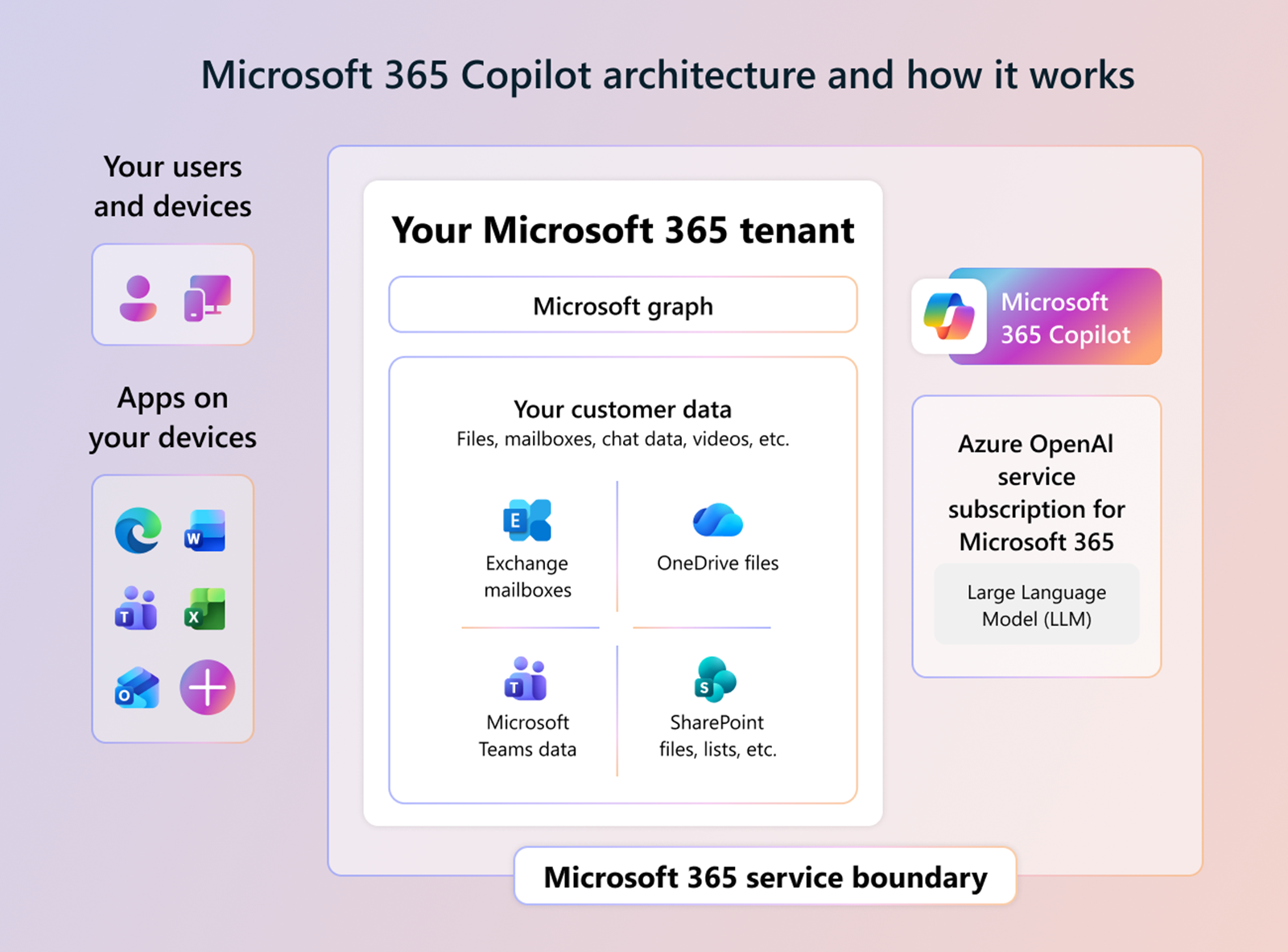
Microsoft Copilot is not a chatbot bolted onto Microsoft 365. It is a reasoning layer embedded directly into the apps your team opens every morning — Teams, Outlook, Word, Excel, PowerPoint. The distinction matters because it means Copilot works on your data, in your environment, without requiring your team to learn a new tool or change their workflow.
For Philippine businesses running M365, that is a meaningful shift in what a software subscription can deliver.
What Copilot Does Across the M365 Suite
Teams
Copilot in Teams can summarize the entire content of a meeting in real time — including decisions made, action items assigned, and questions left unresolved — and deliver that summary as a structured note the moment the call ends. For companies managing multiple client calls per day, this eliminates the manual note-taking step entirely.
It also enables conversational queries against meeting transcripts: "What did the client say about the deadline?" pulls the relevant exchange without scrolling.
Outlook
Copilot drafts email replies based on the thread context and your stated intent. Give it a one-line instruction — "decline this meeting politely and suggest Thursday instead" — and it produces a full draft in your writing style. It also summarizes long email threads so you can read the conclusion before deciding whether to read everything above it.
Word
Copilot generates first drafts from a brief, a set of bullet points, or even an uploaded file. For proposals, SOWs, and internal reports — documents that follow predictable structures — it cuts the time from blank page to reviewable draft by a significant margin. It can also rewrite sections for tone, expand a summary into full paragraphs, or condense a long document into an executive brief.
Excel
Copilot in Excel identifies trends, suggests formulas, and generates charts from natural language. Ask it "show me which product line had the highest growth last quarter" and it builds the pivot and visualization without requiring the user to know the formula. For finance and operations teams managing large datasets, this changes what is actually possible for non-technical staff.
PowerPoint
Copilot builds presentation decks from Word documents or plain text briefs. It applies your organization's template, structures the narrative, and fills slides — giving you a working presentation to edit rather than an empty deck to populate.
Which M365 Plans Include Copilot
Copilot for Microsoft 365 is an add-on license, not included in standard M365 Business or Enterprise base plans. As of 2026, it is available as:
- Microsoft 365 Copilot — the commercial add-on for Business and Enterprise plans, priced per user per month
- Microsoft 365 E3 / E5 + Copilot add-on — the typical enterprise deployment path
- Microsoft 365 Business Premium + Copilot add-on — the path most relevant to Philippine SMEs already on Business Premium
The M365 E7 Frontier Suite announced for May 2026 bundles Copilot into the base license at the enterprise tier, removing the separate add-on purchase for qualifying organizations.
Copilot requires: an eligible M365 base license, an Entra ID (Azure AD) tenant, and for the best experience, Microsoft Search properly indexed across your SharePoint, OneDrive, and Exchange data.
What Makes the Philippine Context Specific
A few practical considerations for local deployments:
Data residency. M365 data for Philippine tenants is stored in regional Microsoft datacenters. For organizations in regulated industries — financial services, healthcare, government-adjacent work — verifying your tenant's data residency setting before enabling Copilot is a required step, not optional housekeeping.
Change management. Copilot adoption in Philippine organizations often runs into the same friction seen globally: teams that do not know what to ask it, or do not trust AI-generated output without a review step. A structured rollout — starting with a pilot group, defining clear use cases, establishing a review workflow — consistently outperforms a broad launch.
Licensing consolidation. Many Philippine businesses arrive at Copilot evaluation while already carrying overlapping subscriptions — separate security add-ons, legacy Office perpetual licenses, third-party productivity tools. A pre-Copilot license audit typically identifies consolidation savings that offset part or all of the Copilot add-on cost.
Getting It Right From the Start
Deploying Copilot is a configuration exercise as much as a licensing decision. The AI's output quality is directly tied to how well your Microsoft 365 environment is set up: clean identity management in Entra ID, properly scoped permissions, and well-indexed content in SharePoint.
An M365 environment that was set up quickly and never hardened will surface messy or incomplete data to Copilot — and expose it to users in ways that create confusion or compliance concerns.
If you are evaluating Copilot for your organization, the honest starting point is an M365 health assessment: understand the current state of your tenant before enabling AI features on top of it.
If you are looking beyond Copilot to fully autonomous workflows, see Agentic AI: What Philippine Enterprises Should Know Before Deploying AI Agents — a deeper look at the infrastructure and governance prerequisites agents require.
Talk to our Cloud team about Microsoft Copilot →